


Sat July 25 2009
 Canadian Copyright Consultation Begins Canadian Copyright Consultation Begins
|
|
01:19 PM by Barcey in E-Book General | News Last week the Canadian Government began a nationwide consultation on copyright modernization. There have been a couple attempts in the last couple of years to update the Canadian copyright laws and last year's Bill C-61 was widely criticized because it was perceived to have been written only with backroom consultation from lobby groups. This time the government has started a website where the public can participate and they are also having public meetings across Canada.
Hopefully Canadians will take this opportunity to voice their opinions. |
|
[ 14 replies ] |
|
MobileRead Week in Review: 07/18 - 07/25
|
|
06:00 AM by Alexander Turcic in Miscellaneous | Week in Review Previously at MobileRead: E-Book General - News and Commentary
E-Book General - Reading Recommendations E-Book Formats - ePub Miscellaneous - Announcements |
Fri July 24 2009
|
calibre 0.6.0 released!
|
|
11:36 PM by kovidgoyal in E-Book General | News Hi All, Finally, after a two month long beta process, I've released calibre 0.6.0. It has tons of new features and bug fixes, some of which you can read about here http://calibre.kovidgoyal.net/new_in_6 A big thank you to all the calibre code contributors, translators and beta testers, without you, this release would not have been possible. Now that I have 0.6.0 out of my hair, I should be going back to the one release per week development cycle you've come to know and love There is also a nice video tour of calibre at http://calibre.kovidgoyal.net/downloads/videos/ Enjoy! |
|
[ 86 replies ] |

Wed July 22 2009
|
First MobileRead Meet Up in Montréal, August 8th
|
|
11:25 AM by Verencat in Miscellaneous | Announcements
From Thursday, August 6th to Monday, August 10th, the 67th World Science Fiction Convention will be held in Montréal, and what better excuses could we have to gather up, exchange on our wonderful devices, eat out and have the best of times! After the event, those interested are welcome to join us to enjoy Montréal's Fireworks Internationals on St-Laurent river banks. Need we say more? This reunion will be one to remember! Details: Date: Saturday, August 8th Leave a message to say you'll be there and get more information in this thread. You can also RSVP to the event on Mobile Read Facebook page here. |
|
[ 0 replies ] |
 I am extremely happy to announce that a Canadian Meet Up will be held in Montréal on August 8th !
|
The Official Motion for Introduction of the Epub Dictionary Format
|
|
10:47 AM by Abelturd in E-Book Formats | ePub
the EPUB industry standard ebook format is on the verge of becoming the predominant format for electronic publishing. This is a turn for the better, because it could resolve the chaotic situation with the myriad of ebook formats out there and make things easier for the publishers and the liseuse manufacturers, and of course for readers. It has it's shortcomings, though, one of which is the lack of dictionary support. Admirable initiative addressing this issue has come from Nate the Great, who started work on the tag specification in this -> thread. In a different thread I proposed that some official body, it would be best if it was IDPF, should prepare the specification for epub dictionary format and then forward it to the publishers and liseuse manufacturers. We as users can put things in motion. My idea was that we, MR members, roundup our suggestions concerning the epub dictionary format and explicitly state our wish for it to be brought into existence. Kind of a petition, if you like. That's what this thread is for. When we come to a general consensus on the matter, we will forward our ideas to IDPF , who is in a position to act on them. Please, any ideas, comments, wishes and suggestions on your side are most welcome. |
|
[ 62 replies ] |
 Dear MobileReaders,
 |
First Toronto (Canada) MobileRead Meetup, 15 August, 2009
|
|
09:54 AM by zelda_pinwheel in Miscellaneous | Announcements
According to MobileRead member nrapallo, "It will be a gathering to see the latest gadgetry (e-ink in all its glory) as well as those tried and true legacy ebook readers (what started it all...) and some in-between attempts... So, mark it in your day planners, bring your ebook reader and come join us for some lively discussions (Did someone say DRM?...) and general friendliness attributed to Torontonians the world over... Sounds like a don't miss occasion to us ! So clear your calendar and charge up your gadgets, and enjoy a bagel for us ! Here are the important details : DATE: Saturday August 15th, 2009 Leave a message to say you'll be there and get more information in this thread. update : thanks to Verencat, you can all also RSVP on the new and shiny MobileRead Facebook page here ! |
|
[ 6 replies ] |
 We are very excited to announce that the first Toronto (Canada) Meetup will be held on the 15th of August !
 Tue July 21 2009
|
BeBook mini to hit stores within 4 weeks
|
|
01:58 PM by ebookreaders in E-Book General | News
The BeBook mini will be able to display ePub ebooks. It is not sure yet whether drm'ed Mobipocket is also supported. The ereader does not offer wireless connectivity; this option will be featured by BeBook 2, which is expected fall 2009. Source: eReaders.nl |
|
[ 59 replies ] |
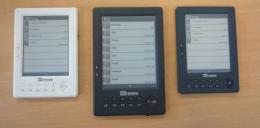 The 5" version of the BeBook, the BeBook mini, will be available for sale within 'the next 4 weeks', according to a tweet from Endless Ideas, the company behind the BeBook.
|
Barnes and Noble announces upcoming eReader
|
|
02:34 AM by Madam Broshkina in E-Book General | News Click the link to read about Barnes and Nobles new eReader.
Barnes and Noble Announces "World's Largest eBookstore", Upcoming eReader I think the announcement could not have come at a better time concerning all whats happened with Amazon and Kindle recently. BARNES & NOBLE LAUNCHES WORLD'S LARGEST eBOOKSTORE Introduces "Every Device" Strategy Upgrades eReader Application Free Downloads Announces Strategic Partnership with Plastic Logic New York, New York – July 20, 2009 – Barnes & Noble, Inc. (NYSE: BKS), the world's largest bookseller, announced today the launch of the Barnes & Noble eBookstore (www.bn.com/ebooks), the world's largest eBookstore, on Barnes & Noble.com (www.bn.com), enabling customers to buy eBooks and read them on a wide range of platforms, including the iPhone and iPod touch, BlackBerry® smartphones, the forthcoming new eReader device by Plastic Logic, as well as most Windows® and Mac® laptops or full-sized desktop computers. |
|
[ 145 replies ] |
 Week's Hot Topics
 Latest Polls
 Latest E-Books


 Latest Forum Activity
