


Sun October 23 2005
 Quake 3 Arena ported to Windows Mobile Quake 3 Arena ported to Windows Mobile
|
|
09:19 AM by Colin Dunstan in Archive | Handhelds and Smartphones
You can download the port and follow the instruction from here. |
|
[ 1 reply ] |
 People at NoctemWare must have a creepy kind of humor as they think it's fun to port something as complex as Quake 3 Arena to the Windows Mobile platform. Well, they did it, and even better, they've already announced an upcoming version 1.1 with hardware acceleration support (for the Intel 2700). And looks like hardware acceleration is badly needed: On a Siemens SX66 phone with 400Mhz, the developer achieved a mere 6-8 FPS.
|
Pocket PC Mag discovers the blog
|
|
09:06 AM by Colin Dunstan in Archive | Handhelds and Smartphones The cool guys from Pocket PC Mag are currently beta testing a dedicated blogging area for their staff members. Also note that with the next issue, Pocket PC Mag will undergo a subtle name change and be known as "Smartphone and Pocket PC Mag". |
|
[ 0 replies ] |
|
The two sides of the Google Print debate
|
|
08:49 AM by Colin Dunstan in Miscellaneous | Lounge
If:book has an analysis of a pair of recent op-eds appearing in The Washington Post, one from each side of the Google Print dispute. Neither side seems close to agreement or backing down. |
|
[ 0 replies ] |
 If you haven't already heard, like you know, if you've been in a coma for the past two months, some people aren't too amused about Google's plans to digitally copy every work in the collections of various leading research libraries. While Google argues that it would make our planet a better place by effectively producing a digital database that would allow users to search book content of every possible publication online, opponents of the project (most of them who are members of the American Association of Publishers) argue that Google does not have the right to scan a copyrighted work without the permission of the copyright holder.
 |
VirtualWiFi multiplies your WiFi adapter
|
|
08:24 AM by Colin Dunstan in Archive | Handhelds and Smartphones
For instance, with VirtualWifi users will be able connect to a guest's machine or play games over one wireless network, while surfing the Web on another. In the realm of handheld computing this technology could prove to be very useful (if adopted), given that most handheld devices are restricted to a single physical network adapter. [via Engadget] |
|
[ 1 reply ] |
 Microsoft is evaluating a new tool called
 Sat October 22 2005
|
"Concept Readius": rollable electronic paper ready for prime time
|
|
02:21 PM by Colin Dunstan in E-Book General | News
Related: A mobile screen to drool over, The future of newspapers |
|
[ 5 replies ] |
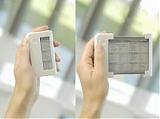 DigiTimes had the opportunity to
 |
Restrain from using illicit Windows Mobile ROMs
|
|
01:24 PM by Colin Dunstan in Archive | Handhelds and Smartphones
Most ROM files which leak on the Net these days are from internal test builds where specific features of a device were being tested either by the Windows Mobile Team or the OEM who made the device. The joy of running your device with the latest Windows version at any cost may only be short-lived: The beta ROMs are prone to severe bugs and make production use often impossible. One example of what could happen:
Not to mention that installing an unofficial ROM may void your warranty and cause you many sleepless nights where you'd lie awake and await the reckoning for your sins. |
|
[ 0 replies ] |
 The Windows Mobile Team
 |
Proposed Solutions for Mobile Computing
|
|
11:27 AM by Bob Russell in Miscellaneous | Lounge
By the way, if you just want to find the "good stuff", try scanning all the way down to the section called "What about hardware innovations?" It's sort of a side-topic to the main article's train of thought, but I think it will be worth a read even if the main topic here doesn't interest you. It proposes a whole new category of mobile computing. And it's one that might be superior to every approach considered or proposed so far. But back to the main discussion of this article. What I am proposing is presented as a word processing solution, but is actually much more than a word processing solution. It is a whole new mobile computing paradigm to enhance the ways we might be able to work on mobile devices. It begins to come much closer to doing laptop-like tasks. Word processing is just the most obvious application to consider. Example Scenario I need to prepare to teach a class. In this case it happens to be a Bible Study, but this scenario can apply to pretty much any word processing session that is not straight typing of paragraphs. My computer is upstairs in my office. I want to work on downstairs at my kitchen table, with my reference books spread out around me. I've got this wonderful smartphone device (a Treo 650 in my case) with a powerful word processing program (Word To Go) and an external keyboard. My battery is all charged up, but I have a power cord just in case. Yes, I could use a laptop, but my work laptop is not available unless I carry it home, and I don't want to buy a laptop (and even worse spend the time to keep it up to date with virus protection, firewall, OS updates, spyware removal, software updates, backups, etc etc) just because I have to do a few word processing sessions. I want to do it with my handheld device... let's take a look at whether it will do the job for me. What I Am Trying to Do I add things like my own observations, questions I intend to ask to the group, material from various reference materials like commentaries and Bible dictionaries. I might also, for example, look at things like the words used in the original language, where those words are used elsewhere, other places in the Bible that have related information about the topic, background information about the places and people and subject, etc etc. So basically I'm digging into portions of the text that I want to understand better, and collecting into my Word document all that supporting information. Some of that additional material is on my smartphone and some is in book form. That means that some of it should be cut and pasted in, and some of it is just typed in. And sometimes various supporting information needs to be moved from place to place. The main point is that, technology-wise, I am basically doing typical word processing tasks. I am copying material from another source, pasting it into the document in various locations, typing in text in various locations, and rearranging information in new sequences and combinations. The problem is -- I can do that easily on the desktop and it's nearly impossible on the smartphone even with an external keyboard. So why doesn't it work? The Issues Explained Handheld software is basically set up to do only three things with regard to documents... view them, make various short editing changes, or add text sequentially by typing a continuous flow of text. What you can't really do are tasks that involve moving around large chunks of text, or navigating easily across portions of the document that encompass more than what fits on a screen. For example, have you ever tried even just highlighting a large section of text in a large Word document on a handheld? It's not so easy to tap and drag when you are trying to highlight 12 (tiny) screens of info. On the desktop, you have the option of clicking at the start, scrolling to the end and SHIFT-Clicking to highlight what you want. I could be wrong, but I don't think there's an equivalent on your smartphone or pda. In addition, some programs may limit how much you can select or copy, but that's a minor issue and whether or not it's an issue now, I'm sure it will not be a problem soon. You certainly don't have a lot of options for easily getting around in a document either. Not to mention that the controls you do have are not necesssarily the most responsive. And even worse, consider the nightmare it is when you want to copy from one document or program into another document. On PalmOS, you pretty much just want to give up before you try. On Windows Mobile, at least you have a chance if you have a nice task switching utility. Scattered Answers I don't think people are trying very hard to solve this problem. I'm no expert, but here are some ideas to get you thinking... What about hardware innovations? We want to have our smartphone in our pocket, but we want to have a fuller laptop experience available also. If we have a device based on Linux, it naturally cries out for a better interface option. Why can't we have our cake and eat it too? Suppose we had a folding keyboard device that did more? Instead of leaning that smartphone or pda up on the keyboard support, how about making the folding keyboard into a clamshell terminal? Give it a decent sized lcd screen along with a keyboard and a mini trackball or touchpad or IBM-like touch dot (those dots weren't so perfect for laptops, but wouldn't they be great for folding pda keyboards!?) And of course an a/c option. This would be incredible for on-the-go computing on a linux environment. You have everything with you in your pocket, and if you want a laptop-like experience, you just add that clamshell terminal to make it perfect for "full" computing. More expensive? Yes and no. Yes, it's more expensive than a typical folding keyboard. But compared to a laptop or tablet pc, you have a really inexpensive full computing environment on the road without a full laptop, and with no synching or backup issues (the data stays on your pda/SD cards and gets backed up with the pda you backup anyway). And over the years, the capabilities will grow and grow, especially related to speed and storage. What's the key innovation? A new member in the spectrum of mobile devices. So far, we have had ideas like SoulPad that is a computer that goes with you and attached to desktops to be used as terminals, but it neither works as a mobile device by itself, nor is it pocketable, nor can you do much if you are not at a desktop PC. We have smartphones and pdas, of course. And Tablet PCs, and handtops, and notebooks/laptops. But no one has ever suggested a way to really get the best of full mobile computing together with pocket computing until now. I'm suggesting that with a Linux smartphone or pda combined with a portable terminal that is essentially a folding keyboard plus integrated pointer/clicker device and integrated screen, you can have the best of both worlds. The pocket device is completely self-sufficient, and when you choose to carry the portable terminal you essentially have a laptop with no data synching issues. That portable terminal could, of course, also have things like hard drives or extra flash memory in them if you desired. Concluding Thoughts Surely we all think about these sorts of issues when we are working with handheld devices. But most people probably haven't quite put into words what the real issues are, because they are so numerous and complicated. It's hard to get to the root of what matters. My hope is that hearing topics like this will help us think through some possibilities or where handheld computing might be headed. And maybe it will even help us to realize that some of the limitations we've accepted as a necessary because of the form factor can still be overcome without star trek technological advances. I have to apologize for this very unprofessional approach to presenting what I think are some important ideas worthy of careful writing and an well thought out presentation. But just getting all this down in first draft form has taken up too much of my morning already and it's a busy day for me. So I'm going to let you see this in it's rawest of raw forms which is essentially a brain dump. I am not even going to bother to read it over once now that it's down, so if there's sections that have my to-do list for today or diary entries or something equally crazy, please forgive me. If I'm lucky, the only problems will have to do with rambling disjoint and unorganized thoughts and incomplete sentences. And if I'm really fortunate, you'll have found some exciting new ideas for mobile computing that inspire new ways of thinking about the future of our software and hardware. At the very least, you might be entertained with an inside view at what my editorials look like before they get cleaned up! So tell me.... What do you think? |
|
[ 5 replies ] |
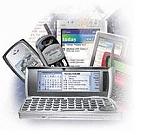 There are a few blind spots in mobile technology. It's a very young technology which needs creative nurturing. Every now and then, I get a little fired up about the ways in which we should already be able to use our mobile devices, but can't. Usually, the thought passes and I just accept our restrictions, but as an experiment this time, I plan to share my thoughts and see if anyone else also cares about it.
 Week's Hot Topics
 Latest Polls
 Latest E-Books


 Latest Forum Activity
