Wed October 03 2007
iLiad Battery Upgrade - updated information
|
|
10:20 AM by Adam B. in More E-Book Readers | iRex
A few highlights:
The signup link is here: http://www.irextechnologies.com/supp...ry_replacement I'm curious if the upgraded backplane is worth the cost. My iLiad is in a case most of the time, and I'm very protective of the screen. But still, it would basically give me a V2 for a small fee. |
|
[ 45 replies ] |
Tue October 02 2007
Sony Reader PRS-505 - MobileRead's Conference Call with Sony
|
|
12:06 AM by NatCh in E-Book Readers | Sony Reader
Sony Reader PRS-505 -- MobileRead.com's Conference Call With Sony It is past Midnight EDT on October 2, 2007, and things may be now be spoken of which could not be spoken of before. You may remember that shortly before the launch of the Sony Reader (PRS-500) Sony invited several members from the Blogosphere out to San Diego to preview the device. Bob Russell and myself were fortunate enough to be included in that group then. This year, before the launch of the PRS-505, Sony's PR Team invited Bob, Alex and myself to participate in a conference call to get the skinny on the new model, and generally discuss both it and Sony's plans for e-books in general. Our thanks to Sony for sharing some of the "nside scoop" on the new member of the Sony Reader line of devices. By now, you've seen the Press Release and the updated spec sheet, so there's no need to go into that in detail, but I'd like to give you my impressions of some of the implications of the new model, now that we can talk about it officially. The conference call was fast-paced and technical in nature, with the three of us firing off questions to the Sony Rep (one of the marketing team members) and the PR firm representative. I'll try to bring some sort of order from the chaos. Let's start with the Library software. It's going to be a replacement for ConnSoft, and will look pretty similar as far as the interface goes, but with some new features. It will support the AutoSync folder feature that was mentioned in the specs. It's not entirely clear how exactly it will handle syncing, but it looks like files placed in the folder will be automatically loaded onto the 505 when it is connected, with the PC side overwriting the Reader side as far as adding books goes. The bookmarks and such should be preserved, as they're not saved as part of the actual book files in the first place. For those who have a PRS-500, it will simply replace the ConnSoft without changing any collections, etc. that you may already have set up. The 505 does require the new software to work, and it should be available for downloading in the near future for those of us who have 500's who want to use it. No, the autosync folder function won't work for the 500, unfortunately. There are some changes in the 505's menus and functions that are worthy of note. While it is still a flat file system (the Sony Rep specifically pointed out that their thinking is that the flat file approach is much more straightforward for less technically minded users), there are some new options for finding books that are very interesting. First of all, there is the ability to sort by date (presumably date added) and alphabetically by author. Also, for those with a lot of books, it scans the list and presents an alphabetical list of books in chunks, i.e. A-C, D-F, and so on. These categories are then directly available with the number keys, which will speed jumping through the book listings considerably. Add these user interface improvements to the display contrast and refresh time improvements, and it should make for a marked improvement in the overall usability of the device. I would also like to address a few improvements we hoped for, but were items that didn't yet change. I know you'll ask about them if we don't talk about them here, because we did. On a couple of the points the Sony rep commented that he didn't know why they hadn't changed them either. First of all, there are still no images in RTF files. So if you want pictures in your e-books on the Reader, you'll have to choose PDF or BBeB format. Secondly, PDF handling is the same as it was (this probably won't change until Digital Editions support comes around). The Reader does great with specially formatted PDFs, but not so good for full-sized PDF pages. For now, you'll need to look at a tool like PDFLRF to make a PDF more readable. With respect to the text on the screen, you can't invert (flip top to bottom) the display. And you still need the Sony Software to buy Sony books, which still means a Windows PC. A computer is also needed to delete books from the main memory. One thing that hasn't changed, but that we've all apparently missed somehow, is that when the audio player is running, there's a speaker icon that appears on the bottom corner (left, I think) of the display. We've wanted a way to tell when it was running, and there it was all along. I suppose we've missed it because we're not running the audio player. Okay, back to the good new stuff! They've implemented a Goto Page function! Pressing the number keys in a book will now bring up a box to enter the page you wish to jump to, and, presumably the "Enter" button will make the jump. There is going to be a clock setting function, but word is that it'll be hidden somewhere, I'm sure we'll find it in short order. This is meant to address the "lost in time" effect that those of us who go for a couple of weeks without connecting to a PC have experienced on the 500. The clock is still used internally, and not displayed on the screen. (Of course, there is now a popular hack available for the PRS-500 that displays the current time.) Battery life has been one of the very strong assets of the PRS-500, we were delighted to hear that the battery life of the PRS-505 is similar, rated for up to 7,500 page turns. The Auto Sleep mode (where it blanks the screen after 60 minutes) will still be there, but it will be an optional feature and it will be defaulted to be off. So if you like this feature, you'll have to turn it on manually, if you don't, you're all set right out of the box. The 505 also implements a full off "Shutdown Mode" option via the menus. This is basically the same thing that Nogg's "off hack" does, now, but it's incorporated into the software directly. The boot time to return from this is reportedly somewhat faster than the 500's but we have no numbers on that yet. One sad note, the AutoLoad.XML function that drives all of our wonderful hacks has been identified as a security issue, so, alas the AutoLoad function won't work on the 505, which means we'll have to find another way to hack it. Incidentally, Sony said that the development team is very aware of the community user tools and hacks, and is impressed with the creative types that are producing such software. However, since the 505 will be recognized as a USB Mass Storage Device, that may not be all that much of a challenge. Yes, you read that correctly, the PRS-505 will be recognized as a USB Mass Storage Device. Furthermore, that recognition should be good for all the major OSs out there. Going along with that, Sony's software will not be required to charge the 505 from a USB port. Naturally they can't assure that it will work with every crazy USB port in the world, but it should charge from all the big hitters: Windows, MacOS, Lin/Unix, etc. The 505 will charge from USB even when the battery is totally flat, which is why Sony has opted to make the AC charger an option rather than included. And there won't be a cradle for this one. While we're on the subject of accessories, the old circle connector won't be found on the 505 (and there was much rejoicing). They've moved to a cover that attaches along the left edge of the Reader at the top and bottom, which means the back of the cover can move away from the device as easily as the front (you can hold both covers and it will swing from the 'binding' just like a 'real' book). That will make it easier to reach the reset button. The included cover is now upgraded to have be leather-like, and the optional 'fashion' covers will be leather covers that sport several pockets for things like memory cards, business cards/ID cards, and even one for boarding passes. For those who like the clip on lights, the existing light sold by Sony will still work with the new device covers. That would seem to imply that most clip on lights that work with the 500 will also work with the 505. Speaking of memory cards, the 505 has two slots, one for Memory Stick Duo (up to 8GB) and a separate one for SD (up to 2GB) -- for a combined 10GB of external storage. But you saw that in the spec sheet, didn't you? What you didn't see, is that we now have word that the 505 will support Collections on memory cards! How often have we longed for that? Internal available user memory is 192meg, which is a big step up from the previous model. Now some things we discussed looking toward the future. Naturally these things can change, and can be altered by outside factors that can't be foreseen, but it's good to get their present frame of mind on these matters. The Sony Rep was quite clear that Sony is committed to assuring ongoing access to books purchased at the ConnStore, even with the announcement of ePub support on the Reader. No statement can yet be made on the announced Borders/Sony e-bookstore however. They specifically stated that Sony is committed to have Adobe Digital Editions support on the 505 model -- when Adobe gets around to completing the software, of course. Sony and Adobe are working together to make this happen. When there is Digital Editions support, there is potential for an astronomical increase in available content, and the Reader is likely to be the first device to work with Digital Editions. We specifically asked about Mobipocket support, and by extension, other secure reading format support. Sony's response was very interesting: they said they weren't interested in locking potential users out of their Readers, that while they are open to entertaining the notion of other reading applications on the PRS line, but that those who control those other applications may not be so open to the idea. We also asked if we might see some of these firmware changes and things like .epub support on the original PRS-500 model, and the response was that they are still considering it (hardware differences seem to play some part here as to feasibility of various bits), but they aren't ready to announce anything, and they cautioned us that some of it may not happen at all. It's to be expected that most of the development resources, especially for new features, will be devoted to newer devices, not older models. Overall, it was a very interesting, and yes, fun discussion. It's always great to have a chance to pick the brains of those who are really in the know, and I'd like to thank Sony for giving us that opportunity. The impression I came away with was that this should be an exciting new installment in the PRS line. Yes it's an incremental improvement, but they've included a lot of the things we would have liked on the 500, suggesting that they do listen. Further, the comments they offered looking to the future of the PRS line are extremely encouraging in terms of their commitment to the Reader concept. Sony is encouraged by convincingly stronger than expected sales with the PRS-500, and is convinced that there is a lot of future potential that they intend to pursue. In terms of overall feel, the device was described as being a smooth metal texture. It is said to have a more solid feel and feel like a better quality build. The body is stronger and reinforced. And yet it's a bit lighter and thinner. Due to extra length, you might not notice the lightness, however, as a shifted center of gravity leaves the feeling that it is firm and solid in your hand. The look of the screen surface is very similar, except for the previously mentioned improvement in contrast. The joystick control has been replaced with a directional button and a separate menu button. The PRS-505 appears to have really taken a significant step forward with respect to becoming a product that can gain wide acceptance from the general consumer market. While the price will continue to be a hurdle for some, the better interface, improved page turn speed,and display contrast will make the difference for others. Sony has very carefully chosen features that will keep operation simple and straightforward. Many have been anxious to see the expansion of the Sony Reader market outside of the U.S. Unfortunately, it is apparently a matter of not just the general complexities of worldwide product development and support, but it also involves development of content agreements which are currently U.S. based. Sony feels that the Reader remains a standout product in terms of its presence in the retail market, the integrated book store, and the overall usability and stability of the devices. Availability of the PRS-505 is set for October 2, 2007 at the online Sony Style store, and soon afterwards at retail stores. Retail price will be approximately $300. Purchases before January 31 will receive a credit for the purchase of 100 available CONNECT Classics titles, and must be redeemed by February 29.
|
|
[ 75 replies ] |
Sony Reader PRS-505 - Specifications
|
|
12:04 AM by NatCh in E-Book Readers | Sony Reader
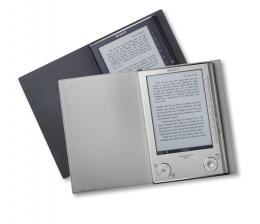
A few weeks ago the scoop appeared in the MobileRead forums about a new Sony Reader model. It looked like the next-gen follow up to our beloved Sony Reader PRS-500. Well kids, today it's official: Sony unveiled the Reader PRS-505. Its biggest improvement without doubt is the new current line of E-Ink display technology that makes screens brighter and refreshes faster than previous E-Ink incarnations. Four more grey levels have been added to the mix, allowing the new Reader to display a total of eight grey levels. What's more, the good folks at Sony must have done some extensive research on ergonomics, because they flipped most of the control buttons to the right, which is supposed to more closely mimic real paper page turns. The PRS-505 is now even slimmer and lighter than its predecessor. And those of you who don't call a Windows machine their own to run the included software, rejoice: USB mass storage support is now included! Unlike stated in previous rumors, the new Reader does not feature any wireless connectivity. If that's a requirement for you, and you don't mind he battery consumption, you'll want to look at the iRex iLiad or perhaps wait until the mysterious and apparently ugly Kindle is released soon by Amazon. PRS-500 vs. PRS-505 comparison: Sony Reader PRS-505:
Sony Reader PRS-500:
The 505's full specs sheet is attached. So, there is only one last question nagging at the back of our minds: If you already own the PRS-500, would you upgrade today? Related: Posted on behalf of Bob Russell, Alexander Turcic, and myself, by virtue of the fact that I'm in the latest time-zone so I have the easiest time staying up for the Midnight EDT deadline |
|
[ 97 replies ] |
Sony Reader PRS-505 - Press Release
|
|
12:00 AM by NatCh in E-Book Readers | Sony Reader
As of this moment, there is no place to link to this which I can find, so I post it here.
Posted on behalf of Bob Russell, Alexander Turcic, and myself, by virtue of the fact that I'm in the latest time-zone so I have the easiest time staying up for the Midnight EDT deadline |
|
[ 17 replies ] |
Mon October 01 2007
British Library books go digital
|
|
12:59 PM by nekokami in E-Book General | News
http://news.bbc.co.uk/2/hi/technology/7018210.stm Interesting quote: "What we can read now is predetermined by a long tradition of what has been considered great literature.... By digitising the whole collection, we give access to the books without the filter of later judgments, whether based on taste or on the economics of printing and publishing." |
|
[ 16 replies ] |
Toshiba and Manganovel Take Manga Global in a New Way
|
|
11:45 AM by NatCh in E-Book General | News
Thanks to grimo1re for the tip on this one! "World’s First Interactive Japanese Manga Web Service Creates Community of 'Reader-Translators'"
Here's the nutshell version: Working together, Toshiba and MangaNovel (it looks to me like the one partly owns the other) have created an on-line distribution point for manga in Japanese. However, they've gone a step further allowing their readers to upload their own translations of the original for sale to others who don't read Japanese. A peer-rating system will give buyers an idea of how good the translations might be. It's an interesting approach, apparently the reader translators are selling only their translated scripts, not copies of the manga itself. When someone purchases a volume of Manga, they have the option of purchasing a translation as well (if the translator charges for it), and the translator gets half of any proceeds from the purchase of their translation. It's not clear to me if the translation would be inserted into the manga images, or be a "subtitle" sort of approach. There's also no comment on what, if any, role DRM will play in the process, nor could I find any mention of it in a quick browse of the site. They seem to have their own viewer software, so that might be complicated, but they do claim that the app will allow you to "read your favorite comics anywhere off or online." Details:
What do y'all think? Will this approach work? Will it take off like a rocket or crash and burn? Or perhaps you're all off to Manganovel's site to download new manga? Full Press Release ....... Manganovel's Site |
|
[ 4 replies ] |
Sat September 29 2007
Keep track with ListPro 5
|
|
01:29 PM by Bob Russell in Archive | Handhelds and Smartphones
ListPro 5 is "the top list and information manager for Pocket PCs, Palms, Smartphones, and Windows desktop or notebook PCs." Not only can you use built-in templates, but you have access to all kinds of features like outlining, alarms, pictures and list sharing. In fact, you can export to either HTML or RSS/XML. This is clearly an upscale list manager with many flexible and advanced features and a nice look to it. You'll have to get used to making the most of your screen real estate with sophisticated lists, but it's amazing what Iliumsoft has been able to produce. My favorite "feature" is the support for multiple platforms - Pocket PCs, Palm OS, Windows Mobile Smartphones, Windows PCs. It's a big advantage to be able to move between those platforms seamlessly, or to export my data if I go to an unsupported platform two years from now. And just in case you're wondering, yes, you can even do the most traditional job of list software - shopping lists! |
|
[ 2 replies ] |
MobileRead Week in Review: 09/22 - 09/29
|
|
07:00 AM by Alexander Turcic in Miscellaneous | Week in Review Have something interesting to say about mobile computing or reading? Join our forums and share your view on topics like the ones discussed at MobileRead this past week... E-books - News E-books - Elsewhere on the Net E-book Devices - iRex iLiad
E-book Devices - Bookeen Cybook Gen3 E-book Devices - Future E-Book Devices Mobile Devices - Handhelds and Smartphones |


iRex has posted more information about their battery upgrade on their blog: 


More than 100,000 old books previously unavailable to the public will go online thanks to a mass digitization program at the British Library.

Do you keep a list of books you've completed, or books you want to read? There's a recent release from
Latest E-Books