


Thu December 18 2008
 Foxit eSlick, New eInk based reader for $229 Foxit eSlick, New eInk based reader for $229
|
|
10:43 PM by lovebeta in E-Book General | News
Included Software: |
|
[ 60 replies ] |
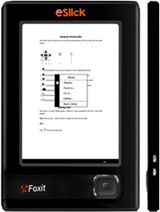 As Foxit's first-generation e-book reader, eSlick is specially designed to support multiple formats and enables users to view various documents with ease. With the thickness of 0.4” (9.2 mm), the weight of 6.4 ounces(180g) and the introductory low price of $229.99($259.99 MSRP), the Foxit eSlick will become the ideal e-book reading device for users. This first edition will be available very soon. If you are looking for a high quality and low-cost e-book reader, the eSlick definitely is what you’re looking for. Click here to pre-order eSlick right now!
Wed December 17 2008
|
Forum restructuring: Device sections
|
|
07:00 AM by Alexander Turcic in Miscellaneous | Feedback In anticipation of new e-book readers emerging in 2009 (*fingers crossed*), we're considering reorganizing the forum structure for the e-book devices. The suggestion is that we move "out" of the "E-Book Devices" section and sort the device sections by vendor:
Before we do so, I would like get as much feedback as possible. Thank you. |
|
[ 52 replies ] |
Tue December 16 2008
|
Forum restructuring: Formats sections added
|
|
02:03 PM by Alexander Turcic in Miscellaneous | Announcements It's long overdue (thank you Harry for your patience), but we've finally added a dedicated section where we can discuss specific e-book formats, their virtues and vices, and the best tools to work with them. Obviously there is still some overlap with other forum categories. Please bear with us as we're migrating existing threads from other places to their new homes. Your feedback is - as always - appreciated. |
|
[ 5 replies ] |
Mon December 15 2008
|
MobileRead wiki now multi-lingual
|
|
03:06 PM by DaleDe in Miscellaneous | Announcements Our wiki is now multi-lingual. If you set the language entry in your "my preferences" entry at the top of the page in the wiki to your preferred language and a page exists in your language it will be displayed instead of the English page. If you would like to help with the translation effort be see https://wiki.mobileread.com/wiki/Help:Wiki_Translation for details on how to go about it. If you have never looked at the wiki before be sure and check it out. It can be reached from the top of the forum page or directly at: https://wiki.mobileread.com/ |
|
[ 3 replies ] |
Sat December 13 2008
|
MobileRead Week in Review: 12/06 - 12/13
|
|
07:00 AM by Alexander Turcic in Miscellaneous | Week in Review If you've been a bit too busy to keep up, here are a few of our favorite stories from the past week. E-Book General - News and Commentary E-Book Devices - iRex Digital Reader E-Book Devices - Sony Portable Reader PRS-500/505 E-Book Devices - Polymer Vision Readius Miscellaneous - Announcements |
|
Some Readius hands-on photos
|
|
04:54 AM by Alexander Turcic in E-Book General | News
I had a chat with Polymer Vision CTO Dr. Edzer Huitema, who is the kind of guy you'd like to have a beer with. Between gulps, he will impart the details of how flexible e-paper really works. And if you order another, he'll give you a hint or two of what we can expect from his company in near future. At the time of the meeting, PV was still working on some finishing touches on the Readius, in particular in regard to the software and UI design. From what I've seen, the newspaper display looks quite compelling; it allows you to see the newspaper in layout mode and then, if you wish, to zoom into the articles. The articles are presented in reflowable text mode. Well, it's wasn't perfect yet, as you can see in one of the photos, the software appeared to have some issues with displaying unicode characters. What really does work well is the folding of the display. I admit I was nervous the first time Edzer handed me the device and asked me to open and close it. It takes some adjusting to fold a display if you are like me used to handle your precious e-book reader with utmost care. PS: The last photo is not really related. |
|
[ 22 replies ] |
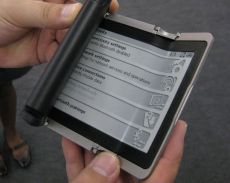 I completely forgot to upload these, but I have a couple of photos I made of the Readius during the Frankfurter Buchmesse exhibit last October.

Thu December 11 2008
|
iRex DR1000S Pressreader Review
|
|
11:21 AM by Adam B. in More E-Book Readers | iRex
The Selection Downloading Newspapers Reading on the DR1000S There are a few things that are slightly disappointing about the software. There appears to be only one zoom level. This isn't a big deal, as the text should be readable to most people with even below average vision. But it would be nice to zoom out slightly to get more text on the screen. The viewer also doesn't have page numbers or hyperlinks. If you're reading an article that says it's "Continued on page 5A", you have no way of quickly navigating there. Because you have to select an area to zoom in on, there is also no way to read effectively without the stylus. This may be a problem for when the DR1000 comes out without the wacom screen. Also, bookmarking and annotation could be useful, but since newspapers expire after 14 days (at least on the PC, I don't know about the DR), I'm not sure if it's necessary. Conclusion |
|
[ 22 replies ] |
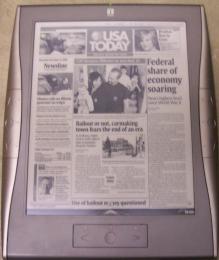 iRex has released software update 1.03 for the DR1000S. This update allows you to read newspapers from
 Wed December 10 2008
|
Nintendo DS in HarperCollins Deal
|
|
02:25 PM by Timoleon in E-Book General | News
From the article: "Nintendo, the Japanese video games company that brought us Donkey Kong and Mario the Plumber, is to announce a deal with the publisher HarperCollins today to make literary classics available to read on its DS portable games consoles. The 100 Classic Book Collection ranges from Shakespeare and Dickens to Jane Austen and the Brontë sisters. It will cost about £20 and will be available initially only in Britain. Readers will turn the pages by brushing a finger across the screen. If the collection is a success, Nintendo may expand the range of books available." Tim |
|
[ 16 replies ] |
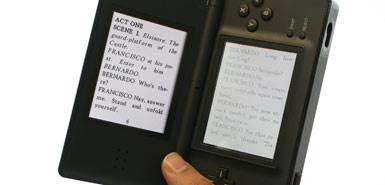 It looks like Nintendo gamers are going to have something else to do with their consoles. Who wouldda thunk?
 Week's Hot Topics
 Latest Polls
 Latest E-Books


 Latest Forum Activity
