


Wed September 27 2006
 Now here is a neat idea: USB CELLs Now here is a neat idea: USB CELLs
|
|
04:17 AM by Stuart Young in Archive | Handhelds and Smartphones
Press release:
Cast you eyes over their website here. |
|
[ 1 reply ] |
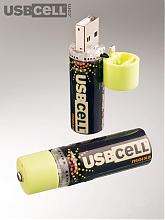 An now for something different. They look like your standard batteries, but look closer - flip the top and you can recharge them via USB. They are produced by Moixa Energy Ltd.
 Tue September 26 2006
|
Sony Reader GPL sources download link
|
|
07:45 PM by Alexander Turcic in Sony Reader | Sony Reader Dev Corner
http://www.sony.net/Products/Linux/D.../PRS-500U.html You will need to hit the link twice and confirm the cookies before. It's only a guess, but the EBOOK_1_2_0_P4.2_20051008_Linux_src.tgz (~25MB) file could be interesting. |
|
[ 29 replies ] |
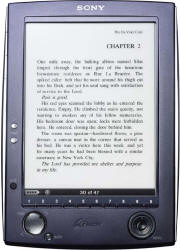 If you aren't already sick and tired of hearing about the Sony Reader today, I have one more for you. Although the Reader hasn't even shipped yet, you can already download the sources which are under GPL. Use the following link:
|
Japanese joint-venture to start e-book business
|
|
07:28 PM by Alexander Turcic in E-Book General | News
|
|
[ 1 reply ] |
 Remember the
 |
Sony CONNECT e-book store opened / Link to Reader manuals
|
|
06:39 PM by Alexander Turcic in E-Book Readers | Sony Reader
Thanks to MobileReader flumbo for the hint! Update: Well I promised myself this would be the last Sony news of the day, so I'll squeeze this one in here: bugsbunny14 found his way to the Sony Reader manuals. Get them while they are hot! Update 2: What can I say. There is more. Sony has just released two press releases regarding the Reader. |
|
[ 9 replies ] |
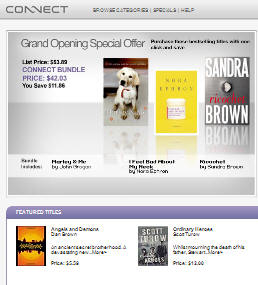 So, without further ado, we close this happy Sony day with another piece of news regarding the Reader: the
 |
Introducing Panasonic's "Word Gear" e-book reader
|
|
12:06 PM by Stuart Young in E-Book General | News
Alas, looks like a Japan-only launch. Full details available here. |
|
[ 10 replies ] |
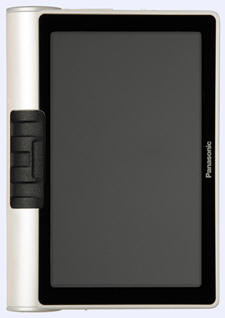
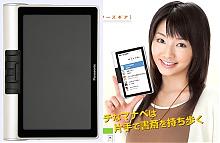 My my, we'll soon have e-book readers busting out all over the place. Engadget is reporting that Panasonic are just about to launch a new device in Japan, dubbed the Word Gear. Specs:
|
Sony Reader available at Sony Webstore
|
|
05:54 AM by Alexander Turcic in E-Book Readers | Sony Reader
Accessories are also available and include a cradle, and protection covers in various colors. So is the Reader already in your shopping cart? * Update * Engadget and Gizmodo currently have a host of new close up pics and some more deats for you to drool over. stu |
|
[ 145 replies - poll! ] |
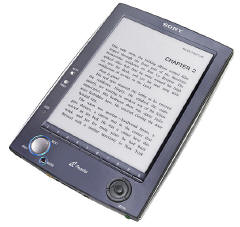 It's been a good day for e-book aficionados. Not only do we have two
 |
The Sony Reader in our hands: MobileRead visits Sony Electronics
|
|
12:02 AM by Bob Russell in E-Book Readers | Sony Reader
There were some anxious moments as Nathan Chance and I awaited our first contact with a real Sony Reader “in the flesh”, not knowing if it could live up to the hype or to our own expectations. But all concerns were very quickly calmed as we found the Reader to be an exceptional and exciting device, well suited for adoption by techies and non-techies alike. FIRST IMPRESSIONS The devices we used were pre-production versions, and were very close to what the final product will be like. The main difference is that the bottom surface will gain some extra reinforcement. The reader itself is a pure delight to look at and to hold, and the e-ink display brings with it a degree of fascination. The more time one spends with it, the more there is to like. It’s high tech and exotic, yet it’s simple, comfortable and useful. It comes with a nice enough cover that most buyers will probably not feel any need to get anything different, but if you want to customize the Reader a bit, there are three other cover colors that will be available as accessories - red, brown and green. Although reading e-books in the past has required some significant compromises because of product weaknesses in the consumer-oriented readers, the Sony Reader has reached a new milestone in functionality and quality of display. It is a device that a book lover can comfortably enjoy without being a consumer electronics expert. It is about the size of a paperback, yet thinner. And you don’t have to worry about losing your page if your fingers slip. You can set it down in front of you, and it will stay open. If you want a big print version, you just change the font size. The Sony e-book reader has been hotly anticipated (see our recent roundup of Sony articles in the press to get some indication of the interest that has been generated). To my knowledge, Sony is the first large company to release an e-ink device in the U.S. aimed at the general book reading population. Certainly the first to offer a device with the sort of base level features you would think the average reader would require in order to be satisfied. While there have been previous predictions of success for early generations of book reading devices with LCD displays, it has become clear that the previous LCD screens were not good enough to bring widespread adoption in the e-book world. Getting books onto the readers has also been a challenge at times for past e-book readers. The Sony Reader solves the primary display issues with e-ink technology, and solves the question of book availability with a large collection of e-books to be introduced along with the new Sony Connect e-bookstore. It promises to make purchase of books specially tailored for the Reader a simple exercise for just about anybody. AN EXCEPTIONAL E-INK DISPLAY The e-ink display is truly revolutionary and unlike most electronic devices, you can comfortably read in direct sunlight. When you see the pictures, I guarantee you that it doesn’t do the screen justice. This isn’t the first e-ink device, but if you haven’t seen e-ink before, then you will be amazed and fascinated. It’s not perfect… the background is gray instead of bright white, and due to e-ink display characteristics you have to wait a second to get to the next page, but the page rendering has been fine tuned so that it’s not a bother and is unlikely to be noticed by readers immersed in a book. Another normal characteristic of e-ink is a slight ghosting effect, but again with some tweaking, Sony has found an excellent setting to balance page turn time and ghost image removal. I did not find that to be an issue at all. The only situation where ghosting seemed to be a noticeable issue was for manga (the comic book novels that are so popular for all ages in Japan and are becoming popular now across the world). But I think manga fans will be delighted to see how cool their art form looks on an e-ink device, and to learn that it will be supported by publishers and the Sony Connect store. As with much of the content, the success of the online store will probably help determine how much additional material will be added over the years. Finally, with respect to the display, it is meant to be read in lighted conditions as it has no integrated light of its own. As we have been discussing on the MobileRead forums, a backlight or some form of integrating lighting is one bonus that many LCD based e-book readers, like PDAs, have provided. However, the Sony Reader is more like paper. You get the awesome display, but you do need light in the room to read it. Fortunately, Sony is working with Great Point Light on a clip on lighting solution that they will sell. OPTIONAL DOCKING STATION There is a nice docking station that doesn’t come with the Reader. It lights up at the bottom to confirm when it’s connected, and it can be used with the Sony Reader whether or not it is in its cover. (There is a sleeve that fits inside for a snug fit if you don’t have the cover on.) It’s hard to judge whether this will be a popular accessory or not. I suppose it depends on pricing, and it will probably be more popular with the average reader population than with tech and gadget fanatics who don’t mind plugs and wires. SOURCES OF E-BOOKS The obvious primary source of e-books is the Sony Connect online store. It’s integrated with the desktop software that comes with the Sony Reader, and it’s where you are going to find your favorite best seller books. (Not every best seller will be available, but they have pumped up the collection of books pretty well, even for product rollout.) The advantage of the Connect store is that it’s easy, especially for novices, and you have a big selection of books all prepared especially for the Sony Reader. The disadvantage is that, like any DRM, it ties your purchase to one technology plus whatever future support the seller decides to provide in the future. In this case, you will be able to read the books as long as you have your Sony Reader, but whether future readers or platforms are supported is up to Sony, both in terms of its success and its policies as the technology marches forward. Alternatively, you can load up any txt or rtf file and read contentedly. Non-DRM’d Adobe pdf files are also supported, but you probably want to create them yourself to format them for a page the size of the Sony Reader. A typical full page pdf file is going to be compressed a bit too much to be a comfortable read, even if you use the landscape half-page viewing option. HTML files saved as rtf (e.g. from MS Word) would probably also work just fine. Gutenberg is a natural choice for picking titles from a gigantic library of public domain books. But I suspect that books from ManyBooks formatted for the Librie would probably work very well also. In addition, there are many other unprotected e-books in supported formats that are constantly being made available. They frequently seem to pop up at MobileRead, so keep your eyes out for interesting titles. Other sites like Steve Jordan Books and Fictionwise appear to have pdf formatted books, but it’s not clear how readable they would be on the Sony Reader. I’m sure we’ll learn quickly on the forums. Any other DRM’d or differently formatted books like Isilo, MobiPocket, eReader, OpenReader, OEBPS, Franklin, Hiebook, Microsoft (.lit), Palm Doc, Rocket, eBookwise-1150, REB 1200/GEB 2150, even DRM’d Adobe Acrobat pdf’s, are not going to be compatible unless you can use a workaround like printing them from your PC to a pdf print driver and format them in line with the Sony Reader screen size. But for most people, that means DRM’d books will be Sony Connect books. GETTING AROUND ON THE DEVICE The navigation is very easy and intuitive, even if not always completely obvious. They main problem I had was that I’m so used to touching links on the screen of my Treo, that I kept tapping the Sony Reader screen expecting it to jump to the link! But you have two small silver page turn buttons on the left front, as well as a big thumb button for turning pages. There’s a dedicated mark button for bookmarking, and 10 buttons to help you either navigate to 0%, 10%, 20%, etc or to choose on screen options like menu items or books to read. There is also a size button that lets you zoom in or out and change the text size. The joystick has an outer “Menu” ring that is convenient to get back to a menu or to navigate up levels towards the main top level menu. The inside joystick can be pushed to follow a link, or moved left/right to navigate back/forward through your navigation history. Up and down on the joystick moves the highlighted menu options. On the outside are up/down volume controls for the music player, and an on/off slider switch, and the covered memory card slot. The bottom of the device has a mini-usb jack, the docking port (which combines the usb and power), a power jack and headphones. It uses standard mini headphones like for a normal mp3 player. I believe that is 1/8”. It’s smaller than ¼” which is used in full size stereo components, and bigger than the really tiny jacks for cell phone headsets. Also included is a slot for a wrist lanyard to be attached. The screen tells you things like how much battery life is left, what page you are on, total pages, the zoom setting (small or medium size) and sometimes shows if it’s busy. Each book has its own menu with the following options: Some notes: TIPS, TRICKS AND UNDOCUMENTED INFORMATION * The zoom sizes are: Standard = 100%; Medium = 125%; Large = 150% * The sound of the mp3 player can be muted by pushing both the up and down volume buttons at the same time. * When you put on the cover, it attaches in the back with a circular snap-on clip. It is a firm but flexible cover that can be bent back behind the reader while reading. It probably won’t protect the display, though, if you accidentally sit on it. The trick is that you can more safely and easily attach the cover by placing the reader face down on a flat surface and then pressing the cover onto the back of the reader. Otherwise, if you do it while holding both parts up in your hands, you may accidentally damage the display if you inadvertently press at the wrong location. * You can probably use a PSP adapter with the reader, but it’s not officially supported. The included A/C adapter has a really tiny transformer brick, which is very convenient for travel. * When the unit goes into sleep mode after a period of time. I think it was about an hour. The screen will go blank, and the device will shut off to save battery and to prevent accidental pressing of the buttons while it is not being used. You wake it up (in less than five seconds it turns on recreates the screen) by pushing the power switch on. * It looks like the page turn controls are only available for left handed operation. But that’s misleading. Once you use it, you find out that if you hold it in your right hand, your right thumb falls naturally to the big page turn button, and is therefore convenient for page turning. If you really want to get fancy, you could create an upside down landscape page to move the controls to the other side! * In a very nice convenience, the battery may just have life when you get it. They are charged prior to shipping, but of course over time the charge is slowly lost. If you are lucky, yours might still have enough power to read with immediately. * If you want the best performing documents, you should import them through the Sony desktop software. I believe it’s due to pre-caching of the page information. But the page turn is not the problem I had expected it to be. With a sample book provided on the demo unit, a one second page turn was about all it took. Slightly more for some complex pdfs that I brought with me. * You can read books with the desktop software. It’s not a fancy book reader, but in a pinch it might do for a quick fix. * A 28 page (in standard text size mode) Operation Guide e-book is included with the reader. But there’s also a printed quick start guide in case you don’t know how to read an e-book yet! * The DRM licensing allows 6 devices to be registered to read purchased books. (But at least 1 must be a PC.) That means that families can potentially share purchased e-books and read them together. * You do not have to have a Windows PC to use the Sony Reader, because you can move files directly to the storage cards in other ways. But you do need a PC to get the faster page turning speeds or to buy e-books from the Sony Connect store. * The menu ring will take you to the menu one level up. You can push repeatedly to advance all the way up to the main menu. SOME NOTES ON MEMORY CARDS Usable Memory Cards: Sony Reader is compatible with both “MagicGate Memory Stick and standard Memory Stick, but if the data requires the MagicGate copyright protection function, it can’t be copied or played on the reader. SD copyright protection is not implemented either. My 4gb SD card was readable, but can’t tell if all 4gb is visible, or just 2gb. SD cards of up to 2gb are supported, but not guaranteed. Up to 4gb Memory Sticks are supported, but they are also not guaranteed. WARNING - Don’t insert a wrong sized card! And if an adapter is needed, be sure to use one. If you insert one of the smaller cards into the slot by mistake, it may need to go to the factory to have the case opened to remove the card. This was a lesson we learned when one of us put the wrong size card into the slot. Fortunately, the factory was next door, so it was a good learning experience and not a tragic event! THE SONY READER PRODUCT TEAM Borrowing from Mohammed Ali, one could say that the Sony Reader team is a lean, mean production machine. It takes a lot to coordinate all the design, production, marketing, promoting, budgeting, planning, working with publishers, creating an online store, etc etc. But in the midst of all the work, you find a very down to earth group of people that genuinely were excited about what they are doing and the product that they are going to be rolling out. As we have seen already, this team wants to pay attention to the user community and to ensure the Sony Reader is a good product for the consumer. They may not be able to provide everything that we consider important like multiple desktop platform support, but neither are they taking the “you’ll just have to live with whatever we give you” approach either. They are working hard to support the customer’s needs and wants as much as possible. They are not naïve about desired features, and they keep an eye on our forums, for example. MAINLY AN E-BOOK READER, BUT IT KNOWS A FEW OTHER TRICKS This device is simple and easy because it supports one main function and does it well. It’s meant to be a book reading device, not a general content viewer to compete with your desktop machine and web reading. But they also acknowledge that there are a couple of basic functions that book readers really appreciate, such as music and RSS feed reading. The level of support for these features is very limited and basic. It’s not meant to compete with iPods or even smartphone feed readers. But the music quality turns out to be very good, and is something that I think many people will appreciate listening to while reading. RSS feed functionality is even more limited as only a preset selection of collected feeds will be available as selected by Sony, not by each user. Obviously, some might be disappointed by that choice, but there are a lot of issues involved in what can be provided and converted and stored for the readers by Sony. And the addition of this functionality at all is sort of a bonus. Nobody will or even should consider buying this device just to read RSS feeds, unless they plan to extract and convert them on their own. Speaking of other tricks like converting RSS feeds on your own, remember that there are formats like rtf and pdf and txt that are natively supported. This means that even without any special assistance from Sony, there may be all kinds of interesting applications that can be developed for the device. For example, maybe a button that captures and prepares driving directions and maps in one simple process to take with you in the car. Or maybe capturing RSS feeds and web pages for reading on the device. (Something like a Sunrise application would be terrific.) Or how about something that creates a nice looking document with your calendar for the day or week for the device. Heck, you could even probably design interactive novels with pictures and choices made by the reader that determine the way the story proceeds. There must be many other applications with important information in them just waiting to be pushed into the Sony Reader to be taken on the go for later reading. It will be very interesting to see what kinds of apps will be made to simplify creation of all kinds of materials for the Sony Reader, as well as what sorts of third party software developers might even be allowed to program for the device itself. SPECIFICATION SUMMARY Display: Formats: Other: SUMMARY OF THE GOOD AND THE BAD Strengths Weaknesses CONCLUSION: AN E-BOOK REVOLUTION IS COMING We have all expected and believed that e-books will become widespread and popular. It’s just a matter of when. Some of us have been lucky enough to have and touch early e-book devices and read books on PDAs and smart phones. With e-ink, everything changes, and for the good. We may see an explosion of interest and new devices, as well as more and more e-book availability. Maybe even improved pricing for e-books and some better solutions for DRM and e-book formats. With the upcoming release of the Sony Reader, as well as other e-ink book readers, we may be seeing a whole new level of interest and adoption of e-books. But it’s not clear what will cause it to catch on. It might just be word of mouth. So those of you who understand what this is all about will have a role to play in speeding the e-book world forward. After all, I’m not sure that people will be inspired to buy these in mass quantities simply because they see it in a store or in a magazine ad. More likely, is that they will catch on because of word of mouth. People will see one and get excited, and go find one to buy. Friends will tell friends who will start reading together. Families will keep one or two around the house and share books. People will start asking libraries to develop a way to loan the books. Grade schools and colleges will start looking for ways to integrate the e-book readers into their programs. Teens might even find it cool to read again. It’s not clear how and when the e-book revolution is going to take the world by storm, but surely it’s coming. We have the opportunity to witness what may become a historic event in the big book of world history. Maybe it won’t have quite the significance of the original printing press or the first transistor or the rise of the world wide web, but don’t be surprised if historians centuries from now point to the Sony Reader as a milestone or a turning point. And we are lucky enough to witness and participate in the beginnings of this revolution right here and now. |
|
[ 29 replies ] |
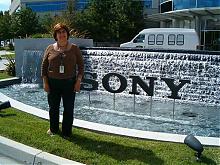 A little over a week ago, MobileRead headed to sunny San Diego, CA with much anticipation for a hands-on sneak preview of the upcoming Sony Reader at the Sony Electronics headquarters. Also present were many members of the Sony Reader product team to present information, answer questions and get feedback. As a bonus, we were also the first outside of Sony to see the new Connect software and e-book store.
 |
Sony Hosts MobileRead (and others) on "Blogger's Day"
|
|
12:00 AM by NatCh in E-Book Readers | Sony Reader
(Hey, y’all, how does this grab you for “reaching out?”) A little after 9 A.M. PDT, September 15, 2006, a small group of bloggers arrived at Sony Electronics’ headquarters in San Diego, CA. Bob Russell and I were fortunate enough to be among them. We came at the invitation of the Project Marketing Team for Sony’s PRS-500, Portable Reader System. Our hosts were several members of the PRS-500 Project Team. These were some of the same folks who brought us last month’s Sony Reader Q&A . The first order of business was an NDA requiring us to refrain from discussing, publishing, etc. all that we heard and saw that day ... until September 26 ... until now. We were shown to a conference room supplied with tables and chairs, presentation equipment, a light breakfast buffet, several laptops and, beside each laptop, a cradle for a PRS-500 Sony Reader -- empty cradles. After a very brief introduction and overview (it was the marketing team, after all), we were each handed one of these highly anticipated devices and left to play with them for a while. The Sony team members circulated amongst us to answer questions and let us in on a few undocumented tricks on the Reader. The format for the whole gathering was very casual, so I felt like I got a pretty solid “hands on” experience with the Reader. Far too short, but they wouldn’t let us take them with us when we left. I’d been preparing for this opportunity for a couple of weeks, so I came armed with both a list of questions to try and get answered (several from this Forum), and an SD card full of files for testing on the Reader with the intent of trying out as many different things as I could. Let me start with the overall look and feel of the device. The hardware they showed us was just shy of production (and the software was the production version), so these observations ought to be pretty reliably accurate. The device had a good, solid feel to its metal case. The majority of it looked to be anodized or enameled, with a bead-blasted type texture, very nice. The left and right edges were a spiffy chromed finish. The size was, for me, quite handy, and convenient (for reference, I wear men’s large gloves). The overall fit and finish were excellent. The display. I’m one of what must still be a very small number of folks who have seen with their own eyes, both the Sony Reader and the iRex iLiad (thanks to a fellow MobileReader near me who has one and was willing to show it off). To my eyes, the Sony Reader display is every bit as crisp and clean a display as the iLiad’s. Yes it is smaller and “lower resolution”, but since they have the same PPI, the difference in resolution is really only a reflection of the difference in size. The difference in available grayscale levels between the two seemed unimportant to me for viewing text. It does matter some for pictures, of course (though not as much as you might expect), but for text -- not so much. The anti-glare finished display does show some ghosting, which I didn’t find noticeably different from the iLiad. To my eyes the ghosting was not much more pronounced than what you’d see on a paper page. I inexorably found myself thinking of the display not as a screen, but as a page. I didn’t set out to do it, and I think it’s kind of silly, but that’s the way I found myself thinking of it. Along with the display quality goes page turn speed, which was excellent for an e-ink device. The limiting factor on the page flips for the Reader, as nearly as I could tell, was the display’s refresh rate. If page flips took longer than the display’s nominal one second refresh rate, I couldn’t tell it. And the Reader does not seem to need any additional (rendering) time to change the pages beyond what is required by the e-ink display itself. I had previously ventured a guess on this Forum that the Memory Stick and SD card had separate slots. That guess was incorrect -- there is a single slot for both. The fellow on my left quickly determined that you must have an adaptor to use MS Duo sticks (the techs slightly less quickly managed to get the card back out for him, though), and Bob found that the Reader read files just fine from his 4 GB SD card, as it did from the 512 MB SD and 64 MB MMC cards I brought along. One of the first tips we picked up was that it is best to use smaller capacity cards if you plan to take them in and out of the Reader frequently. This is becuase the Reader indexes the whole card upon insertion. I didn’t actually time this, but it took 1~2 minutes to index the ~740 files on my 512 MB SD card. When it was done, it displayed the files it recognized sorted in its various categories -- books, audio, pictures, etc. (it did not change any files on the card). I found the user interface obvious enough. If not truly intuitive, it was well within my own range of what I could get used to. I was largely there by the end of the day, in fact. Items were listed down the page with numbers at the right edge. These numbers corresponded to the number buttons below the bottom of the display. A vertical list corresponding to a horizontal set of buttons, as I said: obvious but not intuitive, certainly “getable,” though. Items on the page could be directly selected with the numbered buttons, or highlighted by use of the “jogstick” at the lower right, and then selected by pressing in the jogstick like a button. The number buttons were faster, but I found myself more comfortable using the jogstick. Most of the others preferred the buttons. The jogstick was also used in controlling audio playback. In the audio player application, clicking it controlled pause/play, and left/right handled scanning forward and backward. The audio application apparently supports playlists through the Connect Software, but I didn’t play with that at all. The stereo audio playback was quite nice, by the way. I’m not an audiophile, but it sounded very good to me. They did caution us that it eats battery life, so it’s important not to leave the audio running when you’re not listening to it. A note on the controls -- and let me be completely clear that I am not talking about page flips here. Response to the buttons and jogstick seemed a bit sluggish (for reference, this was comparable to my brief experience with the way the iLiad responded to its various navigation buttons). There wasn’t always immediate, clear feedback that a button press had been recognized, which lead to some “did that take?” thoughts. I think this may be a side-effect of the Reader’s power management (i.e. the processor needing some milliseconds to spin back up from stand-by). I found I particularly noticed this in menu navigation and controlling the audio (not things I plan to spend most of my time doing with a reading device). I noticed it less and less as I played with the Reader. Whatever it is, it sure didn’t seem to affect page turn speed, and that’s what I care most about. The jogstick has a ring around its base that is the menu button. Single clicking the button steps up a menu level, while holding it down goes directly to the top level menu. Toward the Reader’s left side is the mark button. When clicked it toggles a bookmark on the current page (a virtual dog-ear at the upper-right page corner), and holding it down takes you to a list of all bookmarks for the book. There is an internal blue LED that lights the edges of the mark button and the large next/previous page button next to it when you press the mark button, providing good visual feedback for the mark control, and just plain looking cool. The size button along the left edge steps through the three font size increments (in non-PDF’s), and if held down for five seconds will rotate to landscape mode. What we didn’t already know is that this rotation trick also works for non-PDF’s files (texts and pictures). Combined with the three selectable font sizes, this effectively provides something like 200% of the base file’s font size for non-PDF’s. When reading non-PDF’s in landscape, the last two lines were displayed partially grayed out, and were displayed again at the top of the next page after the page flip, which I felt improved the reading experience by keeping me from having to flip back if I lost the thread of a particularly complex sentence during the change (something I, personally, sometimes have trouble with). I have more to say about fonts when I get to file types. I found the page turn buttons, both the pair and the single large round one, reasonably placed. Holding them down jumps forward/backward in five-page steps. We asked about repeating these buttons on the right-hand edge of the display. Apparently there are things in the way, unless “engineering reasons” was just what the design team told the marketing team to stop them asking about it. I found that the large, round page flip button worked well enough for right-handed operation, and of course the paired ones are excellent for left-handed use. There isn’t, however, a good way to operate the Reader right-handed in landscape mode, though left-handed works just fine with the large round page button. When a book is open, the numbered buttons below the display will take you to a matching percent of the text, 1 takes you to 10%, 2 to 20%, and so on. Handy for bigger jumps. On the left edge, near the top, is the SD/MMC/MS slot. The slot’s cover is the same solid metal as the rest of the chromed edge, and felt good, solid and secure when closed, but the bit of plastic/rubber that serves it as a hinge/tether seemed like it might be a bit wimpy (it’s very flexible) -- not something you can really determine without long-term use ... or deliberately yanking on it to see how hard it is to break, which I declined to do. It may be quite durable for all I could tell, it just seemed like it might not be. This impression may well have been a reaction to the very solidness of everything else about the Reader that so impressed me. About the middle of the left edge is the volume control for audio playback, a standard up/down, +/- arrangement. I was told that pressing both at the same time would mute the playback, but I couldn’t get this to work. I also didn’t spend more than a few seconds trying. Since there’s no built-in speaker, audio playback is through the headphone jack only, and if I’m using phones, mute doesn’t seem to me to be that big a deal either way. Personally, I see the audio playback feature as most promising for audio books. They wouldn’t comment on the possibility of future Audible compatibility, except to the effect that they’re open to considering it. On the lower left edge is the sliding power switch; it’s really a suspend/resume switch. The spring-loaded, sliding action works well and I have more to say about it when I get to power management (which the Sony Reader does have). On the bottom edge, at the right is the 3/8” headphone jack. Left of that is the 5V DC-in charging jack. The Reader will charge from a PSP power supply as well as the one it ships with (a mini brick, a lot like the PSP’s power supply), which could be handy to know. Next comes the cradle connector which we were told is a combination of the DC charging function and the functions of the mini USB to the left of this connector. At the left end of the bottom is something that I hadn’t expected, but was instantly glad to see: a lanyard attachment point. The Reader doesn’t ship with a lanyard, which struck me as a bit odd, but one shouldn’t be too hard to scare up. On the back face, near the bottom is the pinhole style reset button. In the very center of the back is what we’ve all been assuming was a speaker -- it's not. It is the attachment point for the covers. The Reader ships with a nicely done black synthetic cover, and upgrade leather covers will be available in several colors. The standard cover seems the best choice for the addition of large, friendly letters. The covers have a magnetic closure to keep them from flopping when closed. There is a bit of a trick to attaching the covers, which they showed us. It works best to lay the Reader face-down on a flat surface and press the cover into the attachment point. The attachment is satisfyingly secure, but not difficult to remove or install. Power Management -- I know that is a very hot topic! I specifically asked what was running while the Reader is on, but not changing the display. The answer was almost nothing. The Reader is just monitoring the various buttons for presses, so it’s almost completely powered down between page turns -- as it should be! In almost five full hours of what could only be considered very hard usage (constantly opening files and flipping pages and playing sound files and so on), the battery meter did not budge, still reading fully charged at the end of the day. The Reader has a sleep or suspend mode that kicks in automatically after an hour with no button presses. It does the same thing that manually exercising the power slide does, namely blanking the page and locking the buttons (to prevent you getting your pages changed for you when you’re not looking), and it stops using power completely. Unlike a laptop’s sleep mode, the Reader comes out of it, right back to where you were, in about four seconds -- flip the slide and you’re back to exactly where you were before in about four seconds. I reset one of the Readers specifically to time the full boot cycle. Resetting begins with paper-clipping the pin-hole reset button (which actually turns the Reader “off” off, as opposed to putting it in suspend mode), and does not blank the display (which could be handy if you wanted to leave it displaying something indefinitely). To boot it from here, you exercise the power slide. From flipping that switch to being back at the main menu was 1:20 ~ 1:30 (I can’t be more specific because I stopped the timer too early when I thought it was done, and it was a second or two before I realized and restarted it, sorry -- 1:25 is my best guess for the actual number). That’s a bit long, but the whole Reader is designed specifically to avoid having to reboot, so you shouldn’t be doing it often. For reference, of the six Readers we played with for about five hours, we only had to reboot one unit that I know of (aside from my deliberate re-boot), and I think that was because I had been trying random files to see what would happen. So not a typical situation. Well, not typical beyond the first few days or so. Before I go to file types, a bit about navigation. On the main menu, the first item is a direct link back to the last opened page of the last opened book. Nice. The Reader keeps your place in each book (unless you remove the file from the Reader, of course), so you can switch between multiple books and keep your place in each of them even without setting bookmarks. It’s supposed to keep this information for SD cards even when you move the SD card to another unit. Each book has a list of its bookmarks, and a history of what pages you’ve visited in it (the jogstick allows moving through the page history list while reading a book, but it won’t take you to a page you haven’t visited yet, so you can’t use it to just flip pages), and there is an “info” section with details about the file. Navigation between books seemed a bit cumbersome, mainly from e-ink’s refresh rate, but nothing jumped out at me as obvious ways to improve the approach they used. I didn’t really find it burdensome after a few minutes, and of course it’s a non-issue when actually reading a file. Okay, now to file types. I had made up a set of files that covered all the reported file formats so I could confirm that they worked. I missed confirming the AAC (but I did get the MP3), and I don’t think I hit all the picture types (though the ones I did hit looked fine, better than four levels of gray sounds like it should). I did get RTF, PDF (A5 sized), cropped PDF (margins cropped from A5), a PDF sized to my best guess, based on presumed display dimensions (note that this was a guess, not an experimentally determined size, so it’s more of a place to start trying when we get Readers to do that experimenting -- 3.54” X 4.85” with a .03” margin or 89.9mm X 123.2 mm with a .76 mm margin), Librié (beta) format from ManyBooks ... hmm, I think I actually missed trying TXT. The A5 PDF was (barely) legible at about 4 point text in portrait mode, and somewhere around 8 points in landscape. The cropped version was a little bigger than that, of course. The sized PDF was beautiful, so it’s in the right neighborhood. And the remaining formats all worked quite well, including the Librié formatted ones, so dust off all those Librié tools you’ve got lying about! Some of them are bound to be useful for the Reader, and I expect the vast majority of the various Librié formatted files out there will work well too. Within my sized PDF and one of my RTF files, I had played around with the font sizes, and randomly changed the fonts to many different, crazy font faces to see how the Reader would display them. The size of the font in the source file definitely does make a difference in all file types, so those who plan to load their own content should keep that in mind, -- that would be most of us, I expect. Not all the different fonts showed up in the RTF (some did), but rather were displayed as more “standard” fonts (no cryptic squiggles or boxes). However, the different fonts did show up very nicely in the PDF file. Some of the more bizarre ones actually seemed more readable on the Reader’s page than on paper, go figure. From what we could tell the Reader does a slant font rather than true italics, for those to whom this is of concern, but it did support smart quotation marks. Sony does have the ability to add fonts from their end (whether they will or not is another matter of course), but there isn’t presently any way for users to add fonts themselves. I suppose there might be some way to hack them in. Now for some surprises. The Reader supports Tables of Contents and other links in both BBeB and PDF formats (I put a link in one of my PDF’s to test that very thing). It uses the jogstick for navigation and selection of the links. The SD card I had my test files directory on is one I use for other things as well (hence the ~740 files I mentioned earlier), the Reader displayed a lot of files beyond what I’d intended to test with, categorized as various things, mostly books. Seeing this, I decided to open some random ones to see what would happen. While the Sony folks were very quick and clear to tell me that they do not support them, I found I was able to open and read a couple of Excel files. I can’t say that all Excel files would work, but the ones I had handy did. There may be other “unsupported” file types that would work which I just didn’t happen to have available.
There was no appreciable difference in page flip time between files on a memory card and files in internal memory. The Reader also seemed to flip pages just as fast in files that had not been run through the Connect Software (having worked out the file pagination when the file was first opened, it already had that information for page flips). Files cannot be moved directly between memory cards and internal memory, in fact, all internal memory content management is done by way of the Connect Software -- there is no file management per se on the Reader; as will ship, that is. As that suggests, the Reader does not mount as a USB drive, for now, anyway. The mini USB port is not a master (or host) port. The picture viewing utility allows for three levels of zooming (by way of the size button), and panning the zoomed picture. There is a bit longer initial load time for files from the SD card compared to the internal memory. It probably varies from card to card, and shouldn’t come as a surprise. While reading, I didn’t notice any difference at all. One of the other guests asked about Sony’s attitude toward hacking of the Reader. The response was to the effect (if not the words) that they planned to continue ignoring it, as they have with the Librié up until now. No one said anything to suggest it, but I suspect that they may view hacking as potentially more help than hindrance to their plans for the Reader. The optional cradle has a clever insert to allow placing the Reader in it both with and without its cover in place. It seems that they’ve been following the general e-ink discussions (I’ve voiced my suspicions before that they follow MobileRead in particular). They’d been testing various reading lights with the Reader, and had a recommendation for us. The “Great Point Light” by the same folks that do the LightWedge, apparently. They said they really wanted an actual LightWedge formatted for the Reader, but that company isn’t interested until they see enough Reader sales to make them believe it would be worth it. They were willing to produce the Great Point Light colored to better match the Reader, however. The Great Point Light is a clip on, goose neck light that uses button cell batteries and is supposed to get somewhere around 30 hours on a set. The notable thing about it is that the LED’s are flat ended, rather than rounded, which provides a more evenly distributed light on the page. We didn’t have a dark place to try it, so we did the best we could with a dimmer corner of the room. The light seemed to throw a nice even pattern that easily included the full Reader (not just the page), and it was bright enough to see even under normal fluorescent lighting, so my best guess is that it should be satisfactory for reading in the dark. I guess that brings us to the Connect Store and Software. Please keep in mind that I’m a programmer, and I pride myself on trying to make my applications as user-friendly (and idiot-resistant) as I can -- from my users’ various comments, I’m apparently fairly successful there. These things, however, necessarily color my impressions of software, so consider that as you read. I’m trying to be as objective as I can but I don’t always know when I’m not. Come to think of it, that disclaimer should also be applied to the above discussions of the software on the Reader itself. First off, they listed some of the publishers that are involved (characterized as being very interested), I didn’t write them down as they rattled them off rapidly while I was eating with one hand, and still playing with the Reader with the other. The list was rather long, so I’m not going to try to list them from memory lest I get some wrong and cause issues somehow. I can tell you they were big names, ones you would recognize both from the local Borders as well as from a college campus bookstore. This made me optimistic about the kinds of titles that they’re likely to have. I didn’t get to spend as much time browsing the Connect Store’s offerings as I’d’ve liked (too busy playing with the Reader, you know), and they didn’t have the complete set of titles loaded on the server they let us play on, but they did have a number of my favorite authors that I don’t believe have ever done e-books before, Anne McCaffrey and Douglas Adams, to name a couple. The Store is accessed through the Connect Software, so it’s effectively browser independent. The Store could benefit from a bit more versatility in searching/browsing, in my opinion, especially with the full 10,000+ titles on it to wade through, but the purchasing mechanism is agreeably straightforward and easy. Choose, click to buy, and a moment later (depending on your connection speed) it shows up on your PC ready for transfer to the Reader. I can already hear my 62 year old, mildly technophobic mother saying, “What? That’s it?” The store will have gift certificates available, and while they don’t currently have any subscription content such as magazines or newspapers available, they are open to them, in as much as publishers of that type of content wish to participate. Prices are set by the publishers, not the Connect Store, so while they get a cut, they aren’t in control of the pricing, and I think we can expect to see price steps corresponding to the hardback/paperback release periods. RSS feeds can’t be added by individual users, but they pointed out that this was largely driven by copyright concerns -- they want to have permission for what they provide. I expect they’ll hit as many of the big ones as they can arrange, maybe even MobileRead! And I don’t know of anything barring us from putting our own RSS feeds on the Reader on our own. As with the Store, I didn’t spend as much time with the Connect Software as I might have liked, being too occupied with the Reader itself, but here are my observations. The Connect Software itself does some interesting things aside from putting content on the Reader. You can read the texts there, if you wish, and the Connect Software supports full text searching (which the Reader itself, lacking an input mechanism, doesn’t), so you have the option of doing any needed searching there. I tried to test copying a line of text from the Connect Software, but I realized after the fact that I had only tried it from an unsecured document that I brought with me (which did work), not from one of their DRM’ed ones (which I can only guess would not have). Sorry about that. I did test what difference running files through the Connect Software makes. I took a 2.6 MB RTF file, ran it through the Connect Software, and loaded it onto the reader. Then I opened both the original, unprocessed file from the SD card and the processed file in turn. The processed file opened immediately, and the unprocessed one took a couple of minutes. The processed file itself wasn’t changed in any way that I could see. What it did was to add a cache file in addition to the actual file itself. From watching it go through the process, it appeared to be compiling pagination information and putting that in the cache file so that it could open and display the file quickly. Rather like opening a book for the first time in eReader’s software on my Palm -- it takes it a moment to count the pages, and figure out the page breaks. If you let the Connect Software on the PC create the cache file, it is significantly faster than having the Reader do the same job because the PC is simply a faster machine. The cache file seems to be where bookmarks and other book information is stored as well (it’s a largely human-readable XML file). Another cool thing the Connect Software allows is creating Collections. These allow moving groups of books around as a group. They also allow specifying what order you want books in the collection displayed on the Reader, say if you want your Honor Harrington books to display in chronological order rather than alphabetically -- no adding numbers to the beginning of the file names! There were a couple of things that I found somewhat suboptimal about the Connect Software, they fell mostly under the heading of judgment calls, and I just would have made different ones (not necessarily better ones). There are sections in the Connect Software, the first is the Library, others are the Reader (when attached), any memory sticks/cards you might have inserted, system hard drives, and the Connect Store. You can also make your own folders, which are the representations of the Collections I mentioned. Each of these things, except the Collections and the Store (I think), had sub-sections for various things, but to move something into the Reader, say, you had to click and drag it onto the top level of each section, i.e. the “Reader” entry, not the Reader’s “Books” subsection. I would have set it up to let you drop it anywhere, and have the software catch it and put it where it needed to go -- as I said, a judgment call. Another thing that took a bit of getting used to, though I do not question the logic of it, is that you have to move things first into the Library section before you can move them to the Reader or to a collection folder in the Library section. This seems to be because this is when the software actually does the caching of page sizes and such. Overall the software seemed serviceable and I didn’t see any genuine issues with it, as I said, just things that I would have done differently. Those things have to be done some way, and the ways they chose certainly worked well enough. Overall, my impression is that the Sony Reader is an extremely well done piece of hardware. The Reader’s on-board software does have some peculiarities, but those seem to be primarily limitations imposed by the new technology of the e-ink itself. While there are some things I’d’ve done differently (not necessarily better, but different), the Connect Store and Software are both more promising, and have more features than I anticipated -- well done on balance. They do what they need to do (plus some nice extras) quickly and without fuss. I don’t ask more than that, and that’s what they’ve delivered. Sony has clearly aimed its Reader to be optimized for reading, I say it hits that mark pretty close to dead on. To my own surprise, I’d put it upwards of 90% of my own idealized vision of an e-reader. If you want something that does a bunch of stuff other than reading, you probably don’t want it. If, however, you want something for reading, page by page, beginning to end, the Reader is definitely something you should look at. I found that it does that little job extremely well, with a few other nifty bits thrown in for good measure.
Thanks, y’all!
I wanted to get this out as quickly as I could, but it’s getting rather late here, so I don’t know how long I’ll hang on tonight. You may have to wait ‘til morning for some of those answers. |
|
[ 24 replies ] |
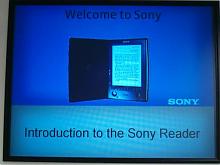 And now it may be told ....
 Week's Hot Topics
 Latest Polls
 Latest E-Books


 Latest Forum Activity
