Register Guidelines E-Books Today's Posts Search


Tue September 10 2013

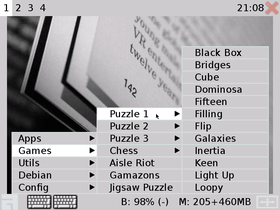
Turn your Kobo into a Debian Linux tablet

09:43 AM by MarekGibek in Kobo Reader | Kobo Developer's Corner

Sorry for the delay - I was on vacation

It's fantastic that you guys were able to solve most of your problems yourself and even managed to run my sample image on a Kobo Mini (fixing bootloader)!!

Now I'm back with the necessary kernel changes needed to install Debian on your Kobos:

https://github.com/marek-g/kobo-kernel-2.6.35.3-marek

The only changes needed to run X11 are related to the eInk display driver and keyboard driver. Inside !Marek/framebuffer-utils folder there are the files to enable and disable eInk's autoupdate mode.

You can undo changes for touch driver because:

  • the changes enable multitouch in the kernel but I still didn't find a working driver for X11 (I started implementing a custom X11 driver but it supports single touch only for now and no right button) - maybe it's because I left single touch events for compatibility with original software
  • according to other posts I probably hardcoded 800x600 resolution somewhere so that needs to be fixed

If you stay with the original touch driver you can use the evdev driver for X11 and still have a working touch and even configure the right mouse button emulation.

I was playing with the image posted here and I've found it's nice to:

  • install nautilus to navigate through your files
  • install okular (with extensions) to view PDF files
  • install calibre - it has great ePub reader (ebook-viewer command) - it needs path to ebook as a parameter so you can use zenity command to open file selector and pass the selected path to ebook-viewer (you can use this command: ebook-viewer `zenity --file-selector`)
  • install gtk-theme-switch to change font sizes and look of gtk apps
  • modify gtk theme to increase slider size
  • modify Firefox's chrome.css file to increase tab sizes etc. - it would be nice to have custom Firefox theme for Kobo

You can add new software to the menu by editing the awesome.lua config file in the ~/.config folder.

I hope that together we will be able to do things like:

  • better screen updates (automatic full screen refresh from time to time)
  • support for screen rotation at any time
  • enable multitouch
  • port existing / write new software
  • ... ?

Have a good fun,
Marek

Related: Sample Kobo Debian firmware image

[ 125 replies ]


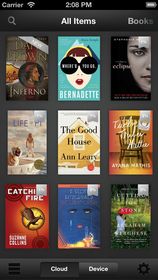
Mandatory Kindle for iOS 3.9.2 released ahead of iOS 7

08:51 AM by jswinden in E-Book Readers | Apple Devices

I mentioned this in another thread, but thought it was important enough to create a new thread as well.

Amazon has released what they call a mandatory update of the Kindle app for those who plan to upgrade to iOS 7. This update will prevent the loss of registration information and books, which could occur if you don't update the app before upgrading to iOS 7.

Download link: iTunes

[ 3 replies ]


EPUB3Reader open-source Android App released

08:34 AM by AlPe in E-Book Software | Reading and Management

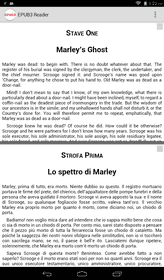
EPUB3Reader is a proof-of-concept Android App optimized for reading complex EPUB 2/3 ebooks, e.g. books with many internal/external links and/or with parallel texts.

The project has been developed by three students, under my supervision, at the Department of Information Engineering, University of Padova, Padova (Padua), Italy.

You can get the APK, the code (MIT license) and some EPUB ebooks featuring parallel texts (CC BY-NC-SA 3.0 license) from the GitHub public repo:

https://github.com/pettarin/epub3reader

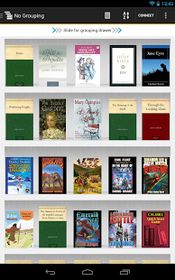
Screenshots are here:

https://github.com/pettarin/epub3rea...SCREENSHOTS.md

The app is not production-grade yet, but I think it shows some interesting UI tricks novel or not widely adopted in EPUB reading systems. Please see the README for a discussion.

Comments are welcome.

[ 19 replies ]


Sun September 08 2013

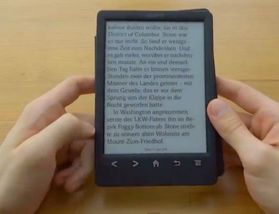
Sony PRS-T3 video review for the undecided

10:23 AM by Alexander Turcic in E-Book General | News

When Sony revealed the PRS-T3 to the world last Wednesday, it brought with it the promise of a smart and satisfying reading experience. With all the new devices announced to bring love, joy and peace to the world of e-reading, we reckon it'd be difficult to make the right purchase decision. Thanks to the guys of allesebook.de, below is a nicely made video review that, although it's in German, should give you a pretty good idea whether the PRS-T3 is the right one for you.


[ 66 replies ]


Calibre Companion V3.1.1 released

05:15 AM by chaley in Archive | Calibre Companion

CC V3.1.1 has been released and should start appearing as an update soon.

This release:

  • fixes the comments font size problems discussed in this thread.
  • adds an option to revert to the old display where structural HTML (center, justify, font changes) were ignored.
  • fixes an uncommon crash returning from book details
  • improves performance returning from book details

Please comment or report problems with this release on this thread or by making a new thread.

[ 29 replies ]


DIY Kindle scanner and DRM cracker

03:33 AM by doctorow in E-Book General | General Discussions

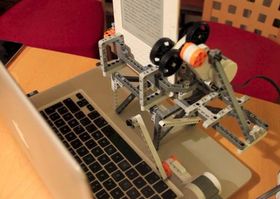
Did you ever wonder how to use Lego Mindstorm to make your Kindle collection DRM-free? Well, according to the maker, "this is an art project reflecting the relation of book scanning, copyright, and digital rights management. This is not intended to be understood as an instruction or invitation, but rather as a provocative thought experiment."

From AllThingsD:

A university professor in Austria has released the video below, showing how he has automated a low-tech approach to bypassing the digital rights management system on the Kindle.

His name is Peter Purgathofer, and he’s an associate professor at the Vienna University of Technology.

Using Lego’s Mindstorms — a basic robotics kit popular with hobbyists — plus a Kindle and a Mac, he has assembled a way to photograph what’s on the screen, and then submit it to a cloud-based text-recognition service.

Here is the video:

http://vimeo.com/73675285

[ 15 replies ]


The college textbook ripoff charted by Bloomberg

03:25 AM by doctorow in E-Book General | News

This is not about the rising cost of college tuition. This is about the rising cost of college textbooks. And it's real bad!

Bloomberg has it as its Chart of the Day:

The cost of college textbooks has more than doubled since the end of 2001 even as prices for other books retreated, illustrating soaring tuition isn’t the only thing to blame for rising higher education bills as the school year begins.

The CHART OF THE DAY shows university textbook prices surged 102 percent through July from December 2001 while the costs for recreational books declined 1.5 percent. Over the same period, the consumer price index measuring the cost of all goods and services rose 32 percent.

Did textbooks just get so much better, or is it a problem that professors, who are in charge of determining what their students have to buy, usually don't have any control over the cost of the textbooks?

[image: wohnai via Flickr]

[ 37 replies ]


Sat September 07 2013

Anti-piracy watermark in e-books gets disassembled, it's a tiny barcode!

06:44 PM by Alexander Turcic in E-Book General | News

Last month we learned how the anti-piracy outfit BREIN is able to track down suspected e-book pirates by matching digital watermarks inside e-books with the transaction records they receive from e-book sellers (not without causing a political controversy). If you've caught yourself wondering how such a digital watermark looks like, a computer science student at the University of Twente was able to get his hands on a watermarked EPUB file and dissected it into pieces. The result is astonishingly simple: embedded on every page in the book is a minuscule image that turns out to be an ordinary barcode. This barcode contains the transaction code which uniquely identifies the e-book purchase.

Other pages in the book all have the same image at the bottom that is nearly impossible to notice with your naked eye. The image is embedded as a Based64 encoded string (see the image depicted above), decoding (using the openssl base64 command) it results in an image with the dimensions of 1 by a few hundred pixels. When seen with a naked eye it looks like a thin white line. [...]

When mapping the 7-bit blocks to characters you can see almost immediately that it results in a string equal to the transaction code. So, the barcode you find on each page in the book represents the transaction code encoded in 7-bit ASCII.

So is that really all? The author of the post doesn't exclude the possibility of other "invisible" watermarks, such as random variations in text or punctuation. How to know for sure? By comparing two separate purchases of the same book.

[ 30 replies ]


live view Latest Forum Activity
Thread / Thread Starter Last Post
Forum: Tolino
Today 04:57 PM
by Builder-Bob (#165) Go to first new post
Forum: Lounge
Today 04:57 PM
by nana77 (#38351) Go to first new post
Forum: Lounge
Today 04:52 PM
by DNSB (#161867) Go to first new post
Today 04:49 PM
by WillAdams (#10747) Go to first new post
Unutterably Silly Change One Word (Nyssa)
Forum: Lounge
Today 04:48 PM
by DNSB (#63671) Go to first new post
Unutterably Silly Guilt by association (ahammer)
Forum: Lounge
Today 04:48 PM
by DNSB (#15110) Go to first new post
Today 04:17 PM
by mkozlows (#0) Go to first new post
Today 04:09 PM
by MrSilverstrike (#664) Go to first new post
Forum: Lounge
Today 03:58 PM
by DNSB (#26351) Go to first new post
Forum: ePub
Today 03:52 PM
by DNSB (#1) Go to first new post
Forum: Plugins
Today 03:48 PM
by Comfy.n (#5) Go to first new post
Forum: News
Today 03:48 PM
by latepaul (#76) Go to first new post
Forum: Onyx Boox
Today 03:40 PM
by bluepeter (#1) Go to first new post
Today 03:21 PM
by DNSB (#9100) Go to first new post
Forum: Plugins
Today 03:09 PM
by enuddleyarbl (#823) Go to first new post
Forum: Calibre
Today 03:08 PM
by maddz (#8) Go to first new post
Today 03:00 PM
by SilverQuill_Book (#32920) Go to first new post
Forum: Onyx Boox
Today 02:42 PM
by perkata (#34) Go to first new post
Today 02:26 PM
by eBookLuke (#33) Go to first new post
Forum: Amazon Kindle
Today 01:10 PM
by Fitz Frobozz (#42) Go to first new post
Forum: Buchclub
Today 12:17 PM
by hamlok (#111) Go to first new post
Today 11:54 AM
by fromych (#430) Go to first new post
Forum: ePub
Today 11:43 AM
by Kayadelenium (#6) Go to first new post
Forum: Sony Reader
Today 11:42 AM
by Ricky D'Angelo (#43) Go to first new post
Today 11:36 AM
by Dirk-71 (#0) Go to first new post


All times are GMT -4. The time now is 04:58 PM.
MobileRead.com is a privately owned, operated and funded community.