


Thu June 14 2007
 E-reader with E Ink Vizplex launched: NUUT NP-601 E-reader with E Ink Vizplex launched: NUUT NP-601
|
|
04:10 AM by Alexander Turcic in More E-Book Readers | Netronix
The Vizplex Imaging Film technology was only recently introduced by E Ink. The specs:
Street price will be around US$300. If you can figure out which e-books format the NUUT supports, feel free to comment here. |
|
[ 31 replies ] |
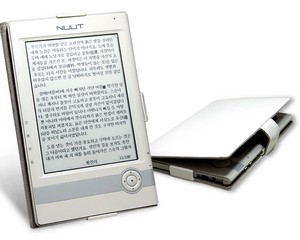 We received word (thanks Eric!) of a new e-reader device launched in South Korea today. Take the hardware case of the
 Wed June 13 2007
|
Specs of Bookeen Cybook E-Ink reader
|
|
04:23 PM by Alexander Turcic in More E-Book Readers | Bookeen
If Bookeen's engineers did their job right, they'll surprise us with a very capable software. Current rumor has it that the Cybook will support Open eBook, PDF, HTML, RTF, at least one format with DRM (perhaps most likely Mobipocket (see Nat's reply)), and MP3. Other formats may also be possible. The rumored launch is summer 2007 at a price of around 350 Euro and US$350 in Europe and the US, respectively. We'll try everything to squeeze out some more information from Bookeen for you. Edit: Some additional info found via this French blog:
Related: Picture of New Bookeen Cybook |
|
[ 90 replies ] |
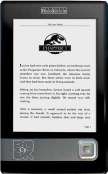 Because we all are just dying for Bookeen to hurry up and deliver us a full-fledged E-Ink based e-reader, we can't help but mention a couple of specs that were leaked to us through MobileReader Hadrien. The new Cybook by Bookeen will have pretty much the same hardware specs like eREAD's
 |
Picture of New Bookeen Cybook
|
|
01:47 PM by NatCh in More E-Book Readers | Bookeen
However, there is a nifty picture of the new hardware, which you're also seeing here, and they do note that we should "stay tuned" so perhaps this is a very short term thing. I suspect this may shed some light on the delays that the NAEB e-Reader has experienced. |
|
[ 54 replies ] |
|
All-In-One IPDF released for iLiad 2.10
|
|
09:59 AM by Adam B. in iRex | iRex Developer's Corner
Features : Here's a list of the included features.
Mambo has created an easy installer for the package here: https://www.mobileread.com/forums/showthread.php?t=22152 |
|
[ 53 replies ] |
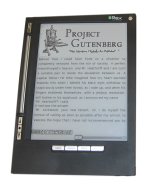 Thanks to jhaker and ricewind for creating an advanced PDF reader for the iLiad.
Tue June 12 2007
|
WildCharge sets a date for Wireless Charging
|
|
02:38 PM by NatCh in E-Book General | News
We've had reports on these technologies before, but they've always been 'in the future'. Technically, next month is still 'the future' but it's at least a specific date, which is a huge improvement. WildCharge's approach is a mat that has charging contacts arranged in lines along it, which require devices that are designed or retrofitted to work with the mats. They're designed to charge multiple devices (whatever will fit on the mat, evidently), which require differing voltage and currents, all at the same time. Follow the link above for their rather exuberant announcement on their site, as well as a bit more detail on how the things work. Hat tip to SciFi Channel's Tech Blog. |
|
[ 12 replies ] |

Mon June 11 2007
|
Expansion of Book Uploads for the iLiad & for other devices
|
|
01:44 PM by Alexander Turcic in Miscellaneous | Announcements With already over 350 carefully styled and handmade e-books for the Sony Reader, and brought to life less than 2-1/2 months ago, the Book Upload section has been a phenomenal success. My personal thanks to everyone who has been so fervently contributing up to today! It's now about time to expand the uploads with formats for other e-book readers. Please take a second to participate in the poll which we will use as an indication how you'd like us to expand the forums. Thanks! Hint: This is a multiple choice poll. |
|
[ 69 replies - poll! ] |

|
Adobe Digital Editions pre-release 1.0 screenshots
|
|
10:44 AM by Alexander Turcic in E-Book Software | Reading and Management
Compared to the last public beta, the release candidate has a revamped user interface, adds support for multiple bookshelves, improves the PDF viewing with smooth scrolling and enhanced zooming, and adds annotations capabilities with support for bookmarks, highlighting, and text notes. Adobe Digital Editions Beta 3: Adobe Digital Editions Release Candidate 1 (1.0.455): |
|
[ 6 replies ] |
 While Adobe is preparing the first commercial release of Adobe Digital Editions, I already had the chance to play with a near-final version of their dedicated e-book reader software.
Sat June 09 2007
|
Tablet computing wins another convert - me!
|
|
10:50 PM by Bob Russell in E-Book Readers | Alternative Devices
Some of you may wonder why I would choose a bulkier X61 over a UMPC, when I clearly love the advantages of a lighter device with a 7"-10" screen size. The decision was based mostly on the quality and power and years of service it should give me versus a Q1 Ultra. How could I compromise features with the Q1 just to cut the size in half? I am hoping that the additional size and weight of the X61 is somewhat offset by the ability to use it as a slate on my lap. As wonderful and useful as the Q1 would be, it seemed a bit too much like an underpowered toy, and I preferred a convertible form factor. In addition, I know that UMPCs are going to be revolutionized in price, features and power over the next couple of years anyway, so it just seemed too early to get one. I suppose the Lenovo tablet might be "overkill", but I know it's got the power and storage I need, and now I get to see how both active and passive digitizers work as well as getting a larger screen. That should give me a much better basis of experience for making decisions about future UMPC purchases. (You know... somewhere around the year 2020 after my gadget budget recovers from this purchase!) I prefer the Q1 size, but I just didn't feel that the UMPCs are quite mature enough to spend all that money on one. I do still long for a UMPC in addition to my X61 because I think the portability would revolutionize my computing life. But at this point a UMPC is going to have to wait. Maybe in 2020! Obvious warning: Don't assume that the X61 is the right choice for everyone. It was the right choice for me, but a UMPC might be your perfect choice. As they always emphasize about tablet devices over at JKonTheRun, for example, these devices all involve trade offs. No single product is going to be best for everyone. Obvious question: Will the X61 also be useful as a ridiculously expensive and overpowered e-book reader? I hope so! |
|
[ 66 replies ] |
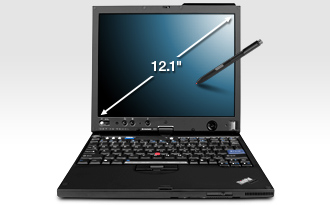 I've never owned a tablet PC before. Until now. I just broke down and spent what feels like my life's savings on a Lenovo X61 tablet convertible. It won out over my other alternatives: a Q1 Ultra or the yet unreleased Asus T83.
 Week's Hot Topics
 Latest Polls
 Latest E-Books


 Latest Forum Activity
