


Thu August 15 2013
 Apple ebook Judge Denise Cote: a crusading prosecutor Apple ebook Judge Denise Cote: a crusading prosecutor
|
|
08:43 AM by TadW in E-Book General | News
The curious case of Apple ebook Judge Denise Cote in Fortune/CNN.
|
|
[ 17 replies ] |
 Talking about biased media -- check this one out:
|
Kobo - Beyond the Book event, August 27 in NYC
|
|
07:45 AM by DStyle in E-Book General | News
Yes Kobo. Surprise me in a good way!!! |
|
[ 105 replies ] |
 From
From 
|
U Press of Kentucky: Own a print book? We give you the e-book for free!
|
|
07:02 AM by Alexander Turcic in E-Book General | News
[via Book Riot] |
|
[ 17 replies ] |
 Here's a very cool development from the University Press of Kentucky. The scholarly publisher just launched a free
 Wed August 14 2013
|
Amazon Silk Has a New Look
|
|
04:01 PM by Jessica Lares in Amazon Kindle | Amazon Fire
http://amazonsilk.wordpress.com/2013...as-a-new-look/
Some screenshots:
Looks great! I applaud the detail that they're applying to making the browser much more intuitive. |
|
[ 15 replies ] |
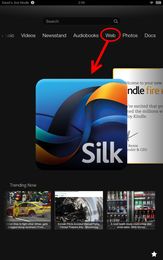 From the Amazon Silk blog:
|
'50 Shades Of Grey' author nails down top spot of top earners
|
|
03:47 PM by Alexander Turcic in E-Book General | News
I read this story, and I feel a sense of deja vu... where I have read about this….. ah, I know, right here. So it's true: sex sells. Anyhow, here's the list of Forbes' top-earning authors, with some of their best-selling novels: 1. E.L. James, "50 Shades of Grey" — $95 million |
|
[ 17 replies ] |
 E L James, the author of the Fifty Shades of Grey trilogy, has just topped Forbes'
 |
Kindle store: Indies avoid DRM to reach wider audience
|
|
03:40 AM by Alexander Turcic in E-Book General | News
An increasing number of e-book vendors have discovered the added value in selling books DRM-free. Perhaps all it would take is one big vendor - Amazon perhaps? - to decide to go DRM-free to make DRM go away for all and forever. |
|
[ 69 replies ] |
 Bufo Calvin from the I Love My Kindle blog analyzed the currently top 100 selling e-books in the Kindle store and made an
 Tue August 13 2013
|
Anti-piracy group wants to catch e-book pirates; vendors now required to help them
|
|
07:32 PM by Alexander Turcic in E-Book General | News
Digital watermarks are one of the technologies being touted as a means to deter piracy of digital content. The issue with watermarks is that they're subject to abuses that could invade an innocent consumer's privacy or, worse, expose him to lawsuits for infringements he did not commit. In a blog entry, Kurt Roeckx, who runs the Dutch speaking e-book store E-webshops, shares his doubt about the legality of working hand in hand with the anti-piracy group.
You can read his full blog entry here. Image: peasap/Flickr |
|
[ 61 replies ] |
 TorrentFreak has published a report
 |
ezPDF Reader 50% off (iOS and Android)
|
|
10:47 AM by Alexander Turcic in E-Book Software | Reading and Management
(*) ratings look somewhat more favorable for the Android edition than for iOS. |
|
[ 3 replies ] |
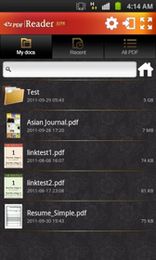 PDF files are everywhere, and there are quite a number of apps that are designed to make it easy to read and annotate them on your mobile devices. ezPDF Reader does an admirable job in this regard (*), and it's currently having a back-to-school deal which nabs a 50% discount off the regular price.
 Week's Hot Topics
 Latest Polls
 Latest E-Books


 Latest Forum Activity
