


 Today, 11:22 AM
|
#1 |
|
Addict
  Posts: 251
Karma: 892441
Join Date: Jul 2010
Device: K2i
|
New best practices tutorials
Its about time...
 You can have everything - aside from photo descewing in a smartphone on free LGPL, MIT and Apache 2.0 software, a smartphone, and a Macbook Neo. For normal books you dont need more hardware anymore. (Out of focus, warped book pages can be interpretated by Visual Language Models no problem.) The concept is: - Smartphone photos of double pages - de-keystone descewing and image enhancement using Camscanner (Android) - OCR using MinerU (.https://github.com/opendatalab/MinerU ) or Mistral OCR (MinerU is local Mistral OCR is an API (with terms of service, read them) - md to epub with kxrz/md_to_epub (.https://github.com/kxrz/md_to_epub/ ) - epub to audiobook with Kokoro TTS (i use a slower .onnx install of it because it is compatible with more current python versions) - audiobook .wav and text into Video read along Audiobook with this: ( https://github.com/hexgrad/kokoro/is...ent-5699959920 ) and MacOS built in Screen Recorder, and ffmpeg The .epub is basically a freebe at this point (it becomes the highest quality format in the chain - so we edit it, I usually use Sigil 0.7.4 - because its regex engine and book view mode are fully featured and dont have limitations of later versions) The thing is - we are talking about the entire pass from book (physical) to epub and audiobook, and read along audiobook as a video taking about three hours... Total. (Using Mistral OCR, which you cant use for commercial books, so add half an hour more for MinerU running locally.) I'll work on the writup today - but I have to do an errand run first - so tutorial will be up in about two hours or so. And here is how you do it: - Smartphone photos need to be taken with natural sunlight ideally. Captures of double pages are fine. The app I'm using for dekeystone and descewing whitening out shadows is Cam Scanner for Android ( https://play.google.com/store/apps/d...sig.camscanner ) with a grandfathered in edu account. Their monetization structure has changed over time. If they try to onboard you into a subscription service - maybe dont and look for an other app - but for the "enhance" postprocessing option (whitening, shadow elimination) and for descewing I personally dont have to tap into their subscription model. The thing is - they are good. (If you know of a better option -- please share, but we need at least output quality that looks like this: ( https://github.com/hexgrad/kokoro/is...ent-5699959920 ) for the next step. Which is a two second use of Briss to cut away the pagenumbers and the fingers (you were holding the book open, while photographing, remember.. No scanner needed in this workflow.) so neither of them gets OCRed.Briss on MacOS can be installed via brew install briss - or if you use a different OS, you can grab a version of it here: https://github.com/mbaeuerle/Briss-2.0 Next we go into OCR powered by a Visual Language Model - there are two Options among the ones I've tested that are good enough for our purposes. The easy one is MistralOCR via API - but for commercial books, thats kind of a no no - even though it spits you out the result in two minutes as a markdown file. The self hosted option is MinerU (just released version 4 (stable)) which uses a Qwen visual learning model. I picked this one for this tutorial, because it delivers usable results at a decent speed with only 5GB of shared memory (as in Macs or Macbooks) or 5GB of VRAM if you are using a (NVIDIA) GPU. This ensures, that anyone with a smartphone and the funds for a Macbook Neo has everything needed for the entire Production chain. It also ensures, that OCR is decently quick - if you do it locally and not via the Mistral OCR api. The only real prerequisite from this point onward aside from that hardware is - that you have python installed (versions 3.10 and 3.14 tested and working on different systems), and that you can create a venv in a folder. Our folders are usually named after the software we are using, and I have them situated in the Documents folder on MacOS. This is for when you take a look at my guides here (https://github.com/hexgrad/kokoro/is...ent-5699959920) which is recommended, if you are on MacOS. Here is what this is. Python is a scripting language that comes with a packet manager called pip that can download from a repository of programms others have created. Everyone is depending on small programs from everyone else - so if one small update on one program breaks something - it can cascade through several programs people use. Also because some small scripts might not be updated over time an depend on a specific python version, and python might not care and just release new python versions -- with python in general we can very quickly get into something called "dependency hell". (This needs that version, and this needs that version, and you better dont update this, and...) But dont you worry - python has a way out of this, called a venv - a virtual environment. This is basically just a folder we can tell python to place in a subfolder of a project folder (mine are in the Documents folder on MacOS). It takes a minute to finish - and after that it has created a folder structure into that venv folder and an activate file (to activate the venv) - and once the venv is activated (MacOS Terminal in Windows Powershell will show a (venv) in front of the current command line, when it is active) the venv folder you just activated acts as the main python install directory -- without the files you are installing from that point forward going into the main python install directory. They go into that venv folder. So this is the convention. For every python programm you run, you usually create a project folder, then you cd into it. Then you let python create a venv inside that folder, then you activate it. And only when the venv is active, you let pythons paket installer (called pip) install software. Because that software and all the little software parts it depends on will then live in that venv folder inside your project folder - isolated and happy ever after, and not be interrupted, or updated by other python software. So if it ran once. It will run everytime. If you created and then activated a venv. Before you pip install the softare a python project needs. Shorthand: we love venv 's. Python users love venv so much in fact, that they created venv management tools like uv to help create, install and manage venv 's, usually when you have multiple versions of Python installed, but we dont get into that right now. Because we can keep it simple. Our python dependencies are not that strict (any python version between 3.10 and 3.14 works (I tested it)) - so we just need one of those installed (If you dont know which to install, install 3.14). We need to mention uv though, because once you go to github and look at installation instructions for python programs, they often use uv -- but you dont need it. uv in those cases is usually used to set up a venv with a certain python version and activate it and then call a certain python versions pip to start installing the software. When you just have one python version installed -- its just. python create the venv please. activate the venv. see the (venv) confirmation of the venv active in Powershell or Terminal (MacOS), and then you can pip install what the tutorials want you to pip install. Leaving out the stuff the tutorials show you before pip in the pip install line, if they use uv. Complicated? Not really. I'm mentioning this to give you a few pointers for when you ask your favourite AI with internet search to tell you how to set up a venv in a folder called venv in a directory in documents called "whateveryoucalledit" on "the operating system you are using". Just let an AI guide you through the process, once you have Python installed. It is two or three command lines, and once you see a folder called venv in your current project folder - you can ask the AI how to activate it. Once you have the venv. And once you have it activated, you can start pip installing python programs into it. Ask the AI how to create a venv named venv in the folder you want it to be installed specifically, because by default the convention is to call the venv folder .venv so with a leading dot - and that hides that folder by default from all kinds of operating systems. Which is wy I like to call my venv folder venv, to have them visible all the time. Why this long roundabout tutorial for how to create a python venv (virtual environment), thats not even step by step and easy to follow? Because python can be installed on all kinds of operating systems. So the process is slightly different on Linux, on MacOS and on Windows. I tested all the programs last week on Windows -- but an AI can guide you better to installing and activating a venv then I can. Also, on some systems it might be called from command line via python, and on some via python3 - and on some with a special command you can ask your AI about - if you installed python via brew on MacOS for example. As you probably will only have one python version installed in the end -- you'll find it out...  (MacOS usually comes with python 3.9 installed these days - which is too old. So you can brew install 3.14 f.e. - but then you have to use special commads so 3.14 creates your venv folders, ... Ask the AI. ) (MacOS usually comes with python 3.9 installed these days - which is too old. So you can brew install 3.14 f.e. - but then you have to use special commads so 3.14 creates your venv folders, ... Ask the AI. )Once you have the venv activated, and pip installed your first programm into it and ran them for the first time, activating that specific venv (alsways have a venv. One for every python program we are working with) and run 'ing the program can be automated a bit as well, so over time you only have to type one or two words for a program launch, and not several lines. Tips for that on Windows (activate.ps1 and run.ps1) and on MacOS (.zshrc entries) can be aquired here: https://github.com/hexgrad/kokoro/is...ent-5699959920 But do it at your own pace. And now - we get into the programs. WHICH WILL ALL BE PYTHON PROGRAMS from now on (buhaha, .. ) - meaning, essentially they are free an follow free software program licenses.They all will have their own "installation guide" in the github readme. (Also, when they tell you to "git install" their program, you can just hit the download button on their github and hit download as a .zip file and then unzip all files (if you see just one folder, go one level deeper and unzip those files into your desired folder.. ) into your desired project folder for that program. (The ones I have in my Documents folder.) Its the same thing. (git has more features, but for all our programs we can do the manual unzip and it works as well.))But I can tell you, that all of them work as of this week, with python 3.10 or 3.14. I installed them all into earch their own folder in my Documents folder on Windows and MacOS, and gave each of them their own venv folder in their own folder in the Documents folder. So lets walk you through them. The first of them is a Quick Tool that allows you to use the MistralOCR API (the Mistral OCR service): https://github.com/madhavarora1988/MistralOCR This requires you having a Mistral account, and have signed into their API management site, and gotten an API key from them. And having payed them Money to use their API. They charge 1 USD per 1000 OCRed pages, and they accept double pages. But you shouldnt use them with commercial books (legal issue), but for our purpose (slightly warped and blurry at the edges smartphone images) -- they are amongst the best service out there (their predict algo is very good). Also this is software thats a year old and not updated, so it uses the old pip install version of mistrals ocr service, so pip might tell you that you might want to install the newer (v2 I think) mistral ocr service it has - just dont. Old one still works. This python program is written for the old one. (You can even ask an AI to rewrite the app.py for the new version but lets not let things get out of hand here... )The next python tool you would use, if you want to do all of this locally - it only takes 5GB of unified or VRAM, and it is called MinerU https://github.com/opendatalab/MinerU On MacOS the most basic install is all you need. (after you created and activated the venv) Their install tutorial expects you to use uv - which again you dont need, just start with pip install and the words after it, once the venv is set up and active) On Windows after the basic install (after your venv is active) you also need to use one additional install command to install their programs torch variant of the software they are using, so you get GPU accelleration. The two pip install commands can be found here, but read their Quick install guide first: https://github.com/hexgrad/kokoro/is...ent-5699959920 MinerU on the default Normal setting (which we want), will take 1 hour to OCR a book with predictive reasoning on a Macbook Neo, and 20 minutes on a Windows PC with at least a 1660 Super. So it is quite heavy - but it turns our Smartphone Photos into clean text reliably. Here is the quality you can expect from it. (The german text is racey, as to test LLM refusals as well - but its from a spanish young adults novel. So if you are over 14, you should be able to stomach it. Just a fair warning - if you can read german.) https://i.imgur.com/5QjAzr7.jpeg The output of both MistralOCR and MinerU is a .md file (they also can output others, but we want the .md output) which we can then feed into the next Python program - namely: md_to_epub https://github.com/kxrz/md_to_epub This (which also would love to have its own venv, so give it its own venv and activate it before its pip install, venv for everyone, venv for every python program. We love venv. ) also needs an additional program to be installed, which it will tell you about in its Readme. (the extra program doesnt need a venv. its not a python program.. )This, is a great little program because it allows us to merge several .md files into one epub. And when we are digitizing a book using a smartphone only, we usually work with batches of 30 or 50 doublepages, because this is monotonous work. Take breaks. It also acts like a diva with filepaths -- but you'll get it to behave... (Read: https://github.com/hexgrad/kokoro/is...ent-5353559142 )The output then is an .epub file, which we can work on in Sigil. To this day I prefer 0.7.4 - for reasons. Note, that this version afair doesnt work with the epub 3.0 standard, which is needed for some - usually asian languages. Ask an AI.. In Sigil we usually work over the Metadata, the TOC, the headline hirarchies (set only h1 headlines in code view f.e.) (the md 2 epub scripts uses very simple html designations, but a great stylesheet that also allows for complex formating - it will be baked into the epub), then do a first and last line on every pdf page flow into the next page check on all the text. (as in we search for those instances where a new page began and see if they are in the text cleanly -- usually for every page in our pdf (we compare them against the pdf), because those are the instances that need to be manually pulled together sometimes, and also the points where OCR (which usually doesnt break at all) breaks most often. Also if a random pagenumber survived Briss, we delete it during that step as well.). Then we usually just search for "- " without the "" on every page, and see if we need to manually remove some hyphenations. (MistralOCR and MinerU are very good at removing them automatically, but sometimes, they miss a paragraph or two...) And after that we are pretty much done with our ePub Ebook.... While working on it in Sigil - as a tip, open the stylesheet, cut out all the text thats in there - save it to a textfile or something, so you can put it back later. Save the epub. Reload Sigil. And do you quality control passes and your first edits, without a stylesheet. The default text presentation in Sigil will look cleaner. Also while you are at it - you will look at the default stylesheet (.css file) that the md 2 epub script inserts, and likely modify it to your liking. Talk with an LLM about it... The next step is to create ourselves an Audiobook version of our book, using an LLM like Kokoro as the "Reader of the audiobook" -- this is what the thread I was linking about five times already initially was all about... This one: https://github.com/hexgrad/kokoro/is...ent-5353559142 It guides you through how to install Kokoro TTS with english and german voice files. Although in a non standard varient (.onnx) which is more compatible with many (even more current) python versions - as Kokoro development stopped a while ago. The downside is, that the onnx version doesnt support GPU acceleration (easily). The upside is, that its generation is much faster than realtime, even on a Macbook Neo. Dont start at: https://github.com/hexgrad/kokoro/is...ent-5353559142 but load in the older topics, and look for my first postings in this github issue -- they will start to give you step by step instructions on how to install the onnx versions of Kokoro for english and german voice output. And give you a few python files which help with sentence cadence, and pronounciation in german. Its all part of the readme there. In the end, one of the scripts there should give you a .wav with the spoken content of a chapter of a book, if you fed it the text of that chapter. With those we can go right into this audiobook creation tool (not a python program ):https://github.com/yermak/AudioBookConverter or we can start to create "Read along Video Audiobooks" of our books, which are very helpful for immersion actually. 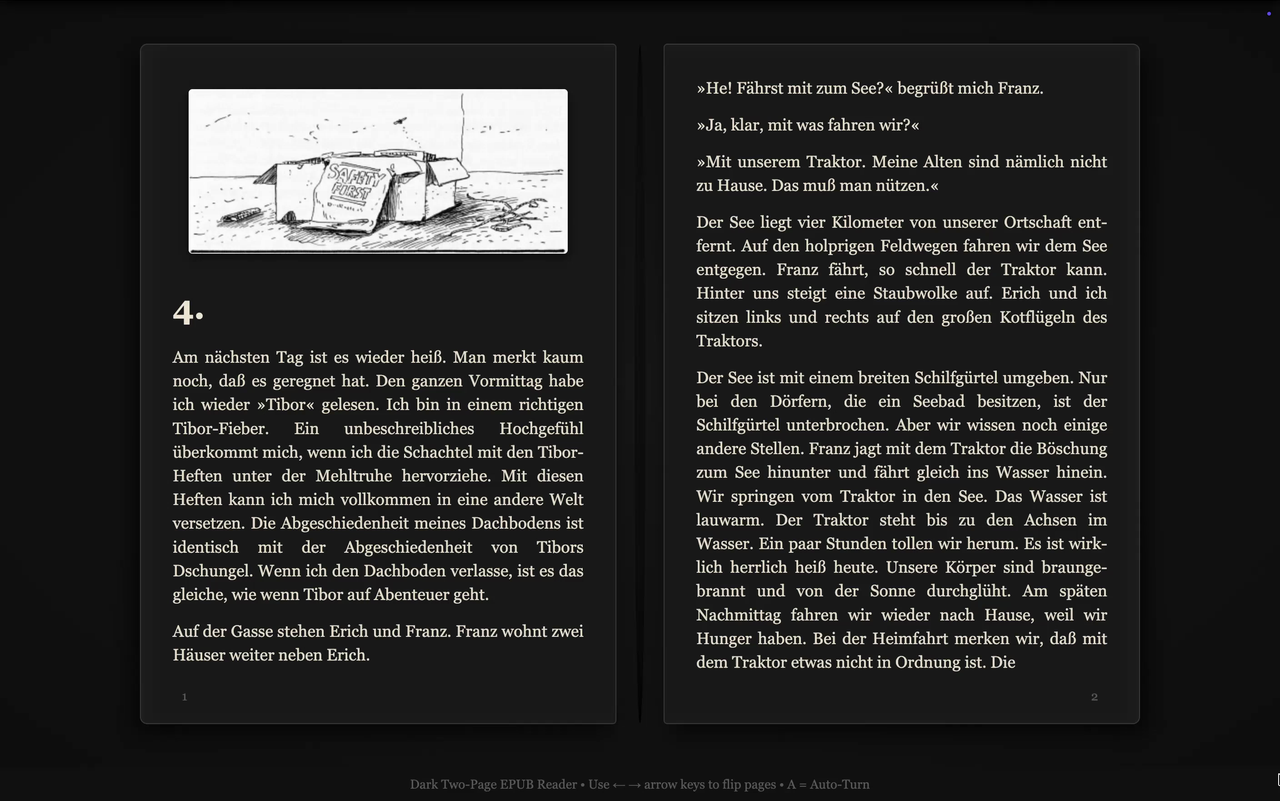 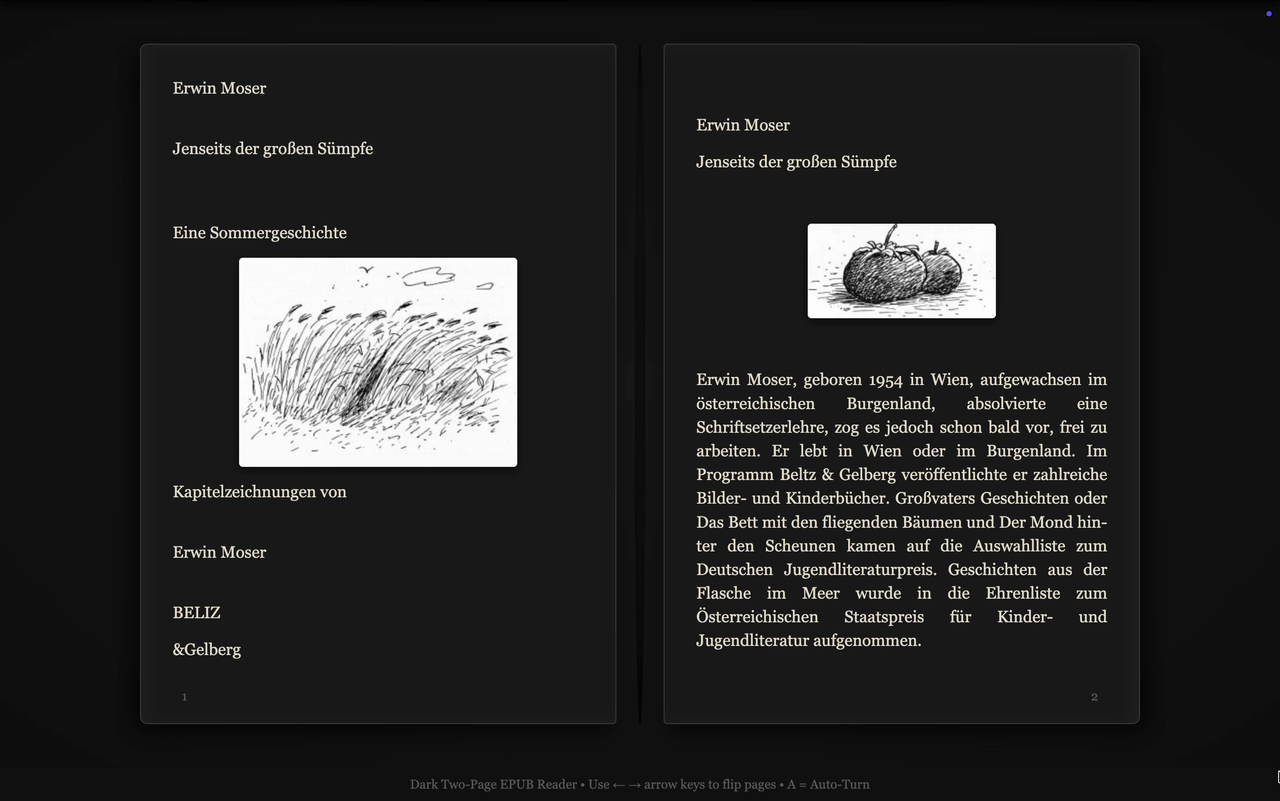 Yes, this is an audiobook (with automatic pageturns) ↑ https://i.imgur.com/f5NA1lI.png https://i.imgur.com/76m0wYo.png If you want to create those as well - start reading this again :https://github.com/hexgrad/kokoro/is...ent-5353559142 Questions? Then talk to an AI, and maybe ask me afterwards. I will lurk around in these forums for a while longer... Also I'm interested in viable alternatives to CamScanner (Android) for all mobile OSes, so if you have experience with them, look at my "wost of 50 doublepages" scan (photo, actually) above, and if yours can compete -- I would be very interested to hear about it. have fun, notimp Last edited by notimp; Today at 04:57 PM. |

|

|


|
Today, 03:05 PM
|
#2 |
|
Addict
Posts: 251
Karma: 892441
Join Date: Jul 2010
Device: K2i
|
A few findings for officionados:
Mistral OCR is better for our purpose. On books with no indents, no additional linespace and all blocktext, it identifies single line paragraphs more often "correctly" compared with "Miner U". They both sometimes just put all of it just into one paragraph tag and call it a day - but Mistral OCR does that less often. This is an edge scenario for "hard-ish to OCR novels" not all novels use that format to begin with. If you are lazy, you just adjust the epub .css (Stylesheet) to also have no indents and no linespace, and justify text orientation and call it a day. If you really, really care - the output from MistralOCR is better in this case. This is formating related, not text recognition related, text recognition is excellent on both Mistral OCR and Miner U (which uses a qwen VL model) Also be warned, that both of them have a tendency to strip away italics in a book. If you need it to be present, at that point its a tossup between how much time you save with the LLM models vs -- how long it takes to put them back manually. If you need OCR that keeps it, non LLM based Finereader (can be an older version) is good at it. But very bad with warped pages... (You cant do a smartphone to digitized book workflow with it.. You need predictive reasoning visual LMs to even consider digitizing a book with a smartphone)The two I recommend in the tutorial above, are very good at predictive text reconstruction. As in -- I tested it with 50ish rough smartphone images (as in I digitized 3 whole books already that way) - they always got the text right. (If our input quality is high enough.) Also a third or fourth point, I've currently forgotten, ... edit: Ah, I remembered. MinerU with its default webgui settings (a webgui is just a webpage frontend for a program - MinerU allows you to access one, once it shows the 127.0.0.something url in the terminal for you to copy into a webbrowser) will identify copyable text in pdfs (block wise), if the pdf is well formed and out of a document to pdf workflow (our photos arent, they are photos. ). In that case MinerU will process pdfs about ten times faster, because it pulls the text from the copy paste layer, and not from a Visual Language Model... Just fyi. My mentioned "time to full book OCR with MinerU" are stated with the photos>pdf (CamScanner creates the pdf) source material in mind.Give it the right pdf and MinerU can be finised with a book in 2-6 minutes. Just not when it needs to engage the VLM.
Last edited by notimp; Today at 04:59 PM. |
|
|
|
| Advert | |
|
|
|
Today, 03:06 PM
|
#3 |
|
Addict
Posts: 251
Karma: 892441
Join Date: Jul 2010
Device: K2i
|
Reserved.
|
|
|
|
 |
«
Previous Thread
|
Next Thread
»
|
 Similar Threads
|
||||
| Thread | Thread Starter | Forum | Replies | Last Post |
| Book Creation Tutorials | HarryT | BBeB/LRF Books | 263 | 03-10-2015 02:31 PM |
| Index of tutorials | kguil | Marvin | 9 | 01-26-2014 10:04 PM |
| Video Tutorials | kovidgoyal | Calibre | 0 | 01-26-2011 08:04 PM |
| Book Creation Tutorials | HarryT | Kindle Books | 76 | 09-21-2010 12:17 PM |
All times are GMT -4. The time now is 08:48 PM.