


 Yesterday, 11:42 PM |
#1 |
|
Diligent dilettante
  
Posts: 3,799
Karma: 52758936
Join Date: Sep 2019
Location: in my mind
Device: Kobo Sage; Kobo Libra Colour
|
Do I have to do a factory reset?
I changed the email address for my Kobo account over the weekend. As I do >90% of all reading in KOReader on my Sage, and more than 90% of my Libra Colour reading in KOReader too, I seldom use my Kobo account in my Libra Colour.
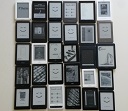
When I changed my email on the website, a message came up saying I'd need to update in my reader. So today, I logged out of my Kobo account on my Libra Colour, logged back in using the new details, and I saw THIS I've tried running Kobo Utilities "refresh metadata" nothin works. My Libra Colour insists I have 680 books, versus the 298 showing as "on device in Calibre. Also, If I click on any of those random images, all I see is the full version of the thumbnail. Selecting "read now" from the menu under the images does the same, adding the information "page 1 of 1" In all of this my KOReader is unaffected, I am using it right now on my Libra Colour just fine. BUT, since Kobo has Storygraph integration, it would be nice to have my Kobo reader working properly again too. Is there a way to fix this short of doing a factory reset and starting from scratch? |

|

|
|
Today, 03:59 AM
|
#2 |
|
Addict
Posts: 264
Karma: 267515
Join Date: Jun 2017
Device: Tolino,Kobo,Onyx,Kindle,BN,PB,Likebook...
|
Add this to .kobo/Kobo/Kobo eReader.conf
Code:
[FeatureSettings] ExcludeSyncFolders=(\\.(?!kobo|adobe).+|([^.][^/]*/)+\\..+) |
|
|
|
|
Today, 04:23 AM
|
#3 | |
|
Diligent dilettante
Posts: 3,799
Karma: 52758936
Join Date: Sep 2019
Location: in my mind
Device: Kobo Sage; Kobo Libra Colour
|
Quote:
Weeellll, I copied and pasted carefully, saved the changes, reopened the file to make sure the changes were saved, then ejected my Kobo. I'm left with a vague, amorphous feeling that perhaps things may just possibly look ever so slightly better than they did before applying your suggestion. So, thanks for trying 
|
|
|
|
|

|
Today, 06:02 AM
|
#4 |
|
Enthusiast
Posts: 29
Karma: 10
Join Date: Jul 2024
Device: kobo Clara color
|
Just as an added information for you and people searching for it later:
The images you saw are icons from the koreader installation the change in the conf file tells kobo not to index the hidden folder where koreader is located (in fact it excludes all hidden folders but the kobo and adobe folders where the stock firmware may store books) |
|
|
|
 |
«
Previous Thread
|
Next Thread
»
|
 Similar Threads |
||||
| Thread | Thread Starter | Forum | Replies | Last Post |
| Aura ONE Factory reset v. manual reset | issybird | Kobo Reader | 5 | 07-28-2020 07:53 AM |
| Factory reset | christopher22 | Kobo Reader | 5 | 02-04-2015 03:26 PM |
| Doing a factory reset but... | DarkRose | Amazon Kindle | 4 | 07-20-2011 06:59 AM |
| How do I do a Factory Reset? | Tinah | enTourage eDGe | 8 | 05-29-2011 09:11 AM |
| Factory Reset! | sammieb77 | enTourage Archive | 55 | 03-18-2011 10:07 PM |
All times are GMT -4. The time now is 10:03 AM.