


 11-21-2007, 10:49 AM
|
#1 |
|
iLiad Maniac
  
Posts: 1,382
Karma: 2369
Join Date: Apr 2006
Location: Germany
Device: Bookeen Opus (i love that thing) and iPad (what an irony)
|
My review of the CyBook Gen3 e-reader
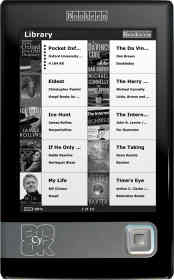 I had a couple of days to play around with the new Bookeen CyBook Gen3. I have to say, I really like the device. I had a couple of days to play around with the new Bookeen CyBook Gen3. I have to say, I really like the device.The reader itself is very lightweight and so very convenient to travel with. The leather case fits smoothly around the CyBook and offers good protection for the screen with the built-in strong frontplate. My Cover did not close properly at first. After using it a while, it started to close just fine. Other than that, its of very good quality. The design of the CyBook itself is far from perfect. While the size and weight are optimal for casual reading, the button layout is not very comfortable. The main button is not easily reached when reading with one hand, and it is difficult to hit the "next" button when holding the device in one hand. The buttons to the side of the CyBook are often accidentally pressed and leave you in the music folder or back in the library. I would prefer the secondary buttons at the top or bottom of the device, so they do not influence your reading experience. As for turning pages, the main button should be centered and there should be additional buttons to each side of the display to turn pages. Reading on the CyBook, it made me even more appreciate the flipbar button of the iRex iLiad. Turning pages on the CyBook leaves my thumb in an unnatural position and holding it this way can be quite uncomfortable. If the center button could be used to turn to the next page, it may at least fix the worst for me. The decision not to use a glossy casing was definitely the right one. Even the matte casing shows fingerprints and smudges very quickly, but you can clean it easily. The casing itself is not that firm. It is a bit loose and squeaky when you hold it. Especially on the left side of the casing, where the secondary buttons are located, the casing moves quite a bit, when putting your fingers around it. But overall the device seems well manufactured. In comparison, while the iLiad 1st generation had a similar squeakiness to it, the 2.0 is very firm and solid. So maybe the CyBook Gen3.1 will do the same. The mini-USB Port and audio socket at the bottom are covered by a little piece of rubber. Since the casing overlaps the mini-USB port, not every mini-USB cable fits. The rubber cover itself can get off quickly. I don't know, if it is really necessary and I guess that many of us will soon live without it. The battery lifetime is more than enough for most people. This might be a bit biased, since I have used the iLiad for so long and only got to use the Sony Reader for a very short period of time. With auto-shutdown turned off and firmware release 1.0, the CyBook's battery last for about five days. With auto-shutdown turned on, the lifetime extends to weeks for a normal reading person. Having a user replaceable battery is also a big plus. Since the CyBook can be charged via USB, it can also easily be charged with my Solio solar charger. I guess I will never run out of energy with that combination. The Software is the best I have seen on any E Ink reader so far (not having seen the Kindle in action yet). Even with its first release, Bookeen has most of what you could wish for for casual reading. For Mobipocket and text formats, the functions to change fonttype and fontsizes are easy to use and you can even add your own preferred fonts. Optionally, you can display a header with book information and the statusbar at the bottom. It would be great if one could also set margins; who knows, we may also see that in the future. The PDF viewer is sufficient for a small screen device, but it really needs to get a real zoom function in the future. Still, it's quite usable with custom-formatted PDFs such as those from Feedbooks.com. The library is nice to look at, and its great to see cover images of books. Now, it would be a great idea to see the position you are currently in a book as well. You can sort by book title, date and size. Unfortunately, all files from internal and external memory are displayed in the library. When you have hundreds of files on your card, you will definitely lose your orientation, since the CyBook does not support a folder structure. There is no search functionality either. Still, if you have let's say less than a hundred e-books loaded, it is very good to use. Not perfect, but the best library on an e-book device so far. At least in my opinion. One thing started to annoy me during my testing. The center button brings up the menu. It should better turn to the next page. Pressing the menu button twice should should close the menu again. Unfortunately, instead it starts on "Start reading" which brings you to the beginning of the book. The menu button is just too prominent and should be used for turning pages. I would like to see page numbers on Mobipocket files, since once you lost your place in a book, you have no way of knowing where you where before. Also, the pagebar is too prominent as an indicator (instead, make it a light gray) and not very informative. Since you don't have an idea on which page you are, the "go to page" menu can be a bit irritating. Really good is the speed. The CyBook is fast. It starts within around 22 seconds. Opening a book is fast, turning pages is fast, changing fonts is fast. That's where E Ink's Vizplex technology shows its strength. And so does the programming skill of Bookeen's programming team. They have done an excellent job so far, and I hope they will continue to support and advance the CyBook over the coming months. Now the bad part. Even though the device uses a Vizplex screen, I am quite disappointed in the display quality. Don't get me wrong, it is still amazing. But in comparison to the non-Vizplex display of the iLiad, it does not even look as good. While the display itself might be bit brighter than that of the iLiad, the iLiad is definitely clearer. The CyBook's display has little dark speckles on the white, and the black is not as dark as on the iLiad (white speckles includes). The fonts are not as crisp and the contrast is lower. It is not by much, but I can notice it (not even without some annoyance). So I guess I am spoiled. I do not know if I have a faulty display, or if the electronics, the display, or the software is responsible, but overall the display quality of my non-Vizplex iLiad is better than my Vizplex CyBook. When you want to buy the CyBook, I cannot recommend the Deluxe package. Get the standard package instead, and the leather cover. If you need an USB charger, buy it for 10 Euro somewhere else. Use your own SD card, and buy a new battery only when you need it. If you need more energy, get a Solarcharger or a battery pack, because you won't need to charge often. In conclusion, I do like the CyBook and I think it is a great alternative to the iLiad if you want a smaller, cheaper device with longer battery life. And not to give the wrong impression: The CyBook is a great reading device. It's a nice piece of hardware with even nicer software. There's surely still lots of room for improvement, but that's always the case with new technology. For me, the CyBook is the second-best e-reader on the market, right after the iLiad -- though it all depends on your needs. My wishes: Improve the layout of the CyBook and improve the software or the iLiad.  And in about six to twelve months we'll will compare those readers against the upcoming new flexible A4 devices. And in about six to twelve months we'll will compare those readers against the upcoming new flexible A4 devices.
|

|

|
|
11-21-2007, 12:15 PM
|
#2 |
|
Grand Sorcerer
Posts: 7,452
Karma: 7185064
Join Date: Oct 2007
Location: Linköpng, Sweden
Device: Kindle Voyage, Nexus 5, Kindle PW
|
Regarding the margins, I think they change depending on the font size. The smallest font size definitely has wider margins and i saw some small changed between other sizes also. If they have done this to avoid getting too long lines then this is a very nice functionality. The setting I would like to have is the line length in em units.
Normally I do not see the dark speckles but in sun light they were very easy to see and I kind of wondered if my display was broken but since I do not see them so much in normal light I assumed it behaved as it should. |
|
|
|
| Advert | |
|
|
|
11-21-2007, 12:24 PM
|
#3 | |
|
iLiad Maniac
Posts: 1,382
Karma: 2369
Join Date: Apr 2006
Location: Germany
Device: Bookeen Opus (i love that thing) and iPad (what an irony)
|
Quote:
|
|
|
|
|

|
11-21-2007, 05:42 PM
|
#4 |
|
Enthusiast

Posts: 37
Karma: 10
Join Date: Jul 2007
Location: Bayern, Germany
Device: Fujitsu Siemens Stylistic 5011D, PocketLoox 720, Sony PRS 505
|
Hi Tribble,
wohnst Du zufällig in der Gegend Augsburg/München? Gruß Andi |
|
|
|
|
11-21-2007, 05:57 PM
|
#5 |
|
Resident Curmudgeon

Posts: 81,306
Karma: 150263711
Join Date: Nov 2006
Location: Roslindale, Massachusetts
Device: Kobo Libra 2, Kobo Aura H2O, PRS-650, PRS-T1, nook STR, PW3
|
The margin is built into the cybook firmware and not the books right?
|
|
|
|
| Advert | |
|
|
|
11-21-2007, 06:13 PM
|
#6 | |
|
Grand Sorcerer
Posts: 7,452
Karma: 7185064
Join Date: Oct 2007
Location: Linköpng, Sweden
Device: Kindle Voyage, Nexus 5, Kindle PW
|
Quote:
|
|
|
|
|
|
11-21-2007, 06:29 PM
|
#7 | |
|
iLiad Maniac
Posts: 1,382
Karma: 2369
Join Date: Apr 2006
Location: Germany
Device: Bookeen Opus (i love that thing) and iPad (what an irony)
|
Quote:
Wenn Du mal in der Nähe bist, sag Bescheid, dann kannst Du Dir den iLiad und das CyBook mal ansehen.
|
|
|
|
|
|
11-22-2007, 05:46 AM
|
#8 |
|
Member
Posts: 19
Karma: 64
Join Date: Aug 2007
Location: Hannover
Device: Cybook Gen3, Palm Zire21
|
Tribble: improve the software on the iLiad
Was fehlt denn an der iLiad-Software im Gegensatz zu der des CyBooks? What's missing in the iLiad software compared to the one on the CyBook? Sebastiano |
|
|
|
|
11-22-2007, 05:58 AM
|
#9 | |
|
iLiad Maniac
Posts: 1,382
Karma: 2369
Join Date: Apr 2006
Location: Germany
Device: Bookeen Opus (i love that thing) and iPad (what an irony)
|
Quote:
Changing font size on the cybook is easy. On the iLiad you can only do + or -. Changing the fon Family. Thats a big plus on the CyBook. The library on the cybook looks nicer, although both devices have their pros and cons there. The software on the CyBook is faster. Faster start of reading applications, and page turns. (Some of it will be the vizplex, but not all) And power management. At least an autooff like on the CyBook would be nice on the iLiad. But the perfect device has yet to be born
|
|
|
|
|
|
11-22-2007, 08:35 AM
|
#10 | |
|
Groupie
Posts: 156
Karma: 99
Join Date: Jul 2007
Device: DR1kS/Cy3
|
Quote:
Pressing the Up key , at least the way I hold my Cybook, is a natural action because my thumb is always near or on the Up key and unlike with pressing the Down key the Cybook will not tip over and stay balanced in my hand. Anyone from Bookeen around ? [pray] |
|
|
|
|
|
11-22-2007, 09:15 AM
|
#11 | |
|
living dead girl
Posts: 40
Karma: 10
Join Date: Nov 2007
Location: Glasgow, Scotland
Device: sony 505
|
Quote:
|
|
|
|
|
|
11-22-2007, 10:45 AM
|
#12 | ||
|
Zealot
Posts: 103
Karma: 269
Join Date: Aug 2006
Device: FBReader on Android
|
Quote:
If you have the auto-shutdown feature turned on, does that mean you have to wait for over 20 seconds when you want to read? I'd find that completely unacceptable. Quote:
So, how much faster is the Gen3 than the PRS-505 (which, I've heard, spends about 2000 ms between pressing the next-button and the next page being ready for reading)? |
||
|
|
|
|
11-22-2007, 11:05 AM
|
#13 | |
|
Zealot
Posts: 103
Karma: 269
Join Date: Aug 2006
Device: FBReader on Android
|
Quote:
|
|
|
|
|
|
11-22-2007, 11:18 AM
|
#14 | |
|
Grand Sorcerer
Posts: 7,452
Karma: 7185064
Join Date: Oct 2007
Location: Linköpng, Sweden
Device: Kindle Voyage, Nexus 5, Kindle PW
|
Quote:
How do you get to an upper limit of 200ms? I tried to press the page turning button as fast as possible 10 times and the page turning speed is around 1.5 seconds. It might be somewhat faster since you cannot press the button before the page has turned so sometimes you miss. But this page turning speed does not disturb the reading experience at all. |
|
|
|
|
|
11-22-2007, 11:25 AM
|
#15 | ||
|
eBook Enthusiast

Posts: 85,560
Karma: 93980341
Join Date: Nov 2006
Location: UK
Device: Kindle Oasis 2, iPad Pro 10.5", iPhone 6
|
Quote:
Quote:
|
||
|
|
|
 |
«
Previous Thread
|
Next Thread
»
|
 Similar Threads
|
||||
| Thread | Thread Starter | Forum | Replies | Last Post |
| My video mini-review of the Cybook Gen3 | ottocrat | Bookeen | 54 | 05-09-2008 03:14 AM |
| Cybook gen3 Review | bob_ninja | Bookeen | 13 | 04-11-2008 11:14 PM |
| Cybook Gen3 Review at eBooks About | KatrinaCardway | Bookeen | 0 | 11-15-2007 07:45 AM |
| My Cybook Gen3 Review | penty | Bookeen | 10 | 10-08-2007 08:03 PM |
All times are GMT -4. The time now is 01:27 AM.