Quote:
Originally Posted by DNSB

If you are feeling nasty, you can use the --break-system-packages option for pip.
I'd try sudo pip install libunrar-dev
If that doesn't work, pip install libunrar-dev --break-system-packages
Edit: I was looking at Launchpad and there are quite a few options so you may have to do some more digging on your own.
|
Thanks for the detailed reply, DNSB. Much appreciated!
I installed libunrar-dev with:
Code:
sudo apt install libunrar-dev
and then tried installing unrardll in a virtual environment with:
Code:
pip install unrardll
This time it was able to build the wheel and installed successfully!
Unfortunately, it did not help me achieve my goal (as below).
Quote:
Originally Posted by kovidgoyal
Why do you need to install unrardll? calibre ships with a private copy already.
|
Hi Kovid!
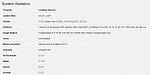
Actually, I am running calibre-web as the frontend UI along with a headless calibre installation.
After installing calibre-web, among the list of other programs installed, unrar shows as uninstalled. With DNSB's advice, I managed to install unrardll, but unrar still appears as uninstalled.