Quote:
Originally Posted by shinfieldgirl

thank you Better Red
but please could you tell me where to find the book editor and the Library manager
I have had a stroke and I have forgotten where to find things,
|
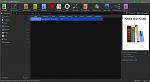
The "Library Manager" is the program that starts when you run calibre, will look something like this ("Edit book" button marked):
If you don't use, or only make limited use of keyboard shortcuts, I suggest you go into Preferences->Shortcuts and set the ones you'll probably never use to None… particularly those that show/hide user interface elements like the Search bar, Tag browser etc. Ditto the Book editor.
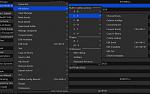
There's an All Actions feature you might find useful, you can show it in the status bar (Preferences>Look and feel), or add it to a toolbar or menu, I have it my book list context menu:
I had a stroke 20+ years ago, I forget people's identities and to a lesser extent their faces… particularly if I encounter them somewhere I don't normally see them.
BR