The last epub you uploaded had both epub2 and epub3 solutions.
the svg code for the the epub2 solution was:
Code:
.svg_inline {
  display: inline-block;
  width: 100%;
  height: auto !important;
  margin: 0;
  text-indent: 0;
}
which results in the image
always scaling to fill 100% of the width of the window, rather than the coditional height parameters we've been discussing.
For the epub3 solution,
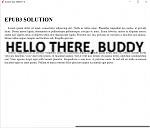
at a max height of 4em these are the results I get when the window is wide:
at a max-height of 2em this is what i get:
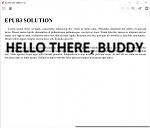
In all cases, it doesn't seem to care about the max-height value (at least not for determining the height of the image). It just keeps growing to fill the window width-wise.
EDIT: I also updated your original file to include the text-alignment and the border as per your latest message, but it made no difference in terms of the above described behavior (the only difference now being that there was a red border... obviously).