12 Oct 2022 (in calibre 6.7.0)
- Python Template Mode (PTM) lets you write templates using native python and the calibre API. The database API will be of most use. PTM templates are much faster than the other template modes and can do more complicated operations, but you must know how to write code in python using the calibre API.
A PTM template looks like this:
Code:
python:
def evaluate(book, context):
    # book is a calibre metadata object
    # context is an instance of calibre.utils.formatter.PythonTemplateContext,
    # which (currently) contains the following attributes:
    # db: a calibre legacy database object
    # globals: the template global variable dictionary
    # arguments: is a list of arguments if the template is called by a GPM template, otherwise None

    # your Python code goes here
    return 'a string'
You can add the above text to your template using the context menu, usually accessed with a right click. The comments are not significant and can be removed. You must use python indenting.
The context object supports str(context) that returns a string of the context's contents, and context.attributes that returns a list of the attribute names in the context.
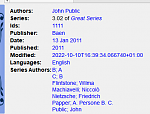
Here is an example of a PTM template that produces a list of all the authors for a series. The list is stored in a Column built from other columns, behaves like tags. It shows in Book details and has on separate lines checked in Preferences->Look & feel->Book details. That option requires the list to be comma-separated. To satisfy that requirement the template converts commas in author names to semicolons then builds a comma-separated list of authors. The authors are then sorted, which is why the template uses author_sort.
Code:
python:
def evaluate(book, context):
    if book.series is None:
        return ''
    db = context.db.new_api
    ans = set()
    # Get the list of books in the series
    ids = db.search(f'series:"={book.series}"', '')
    if ids:
        # Get all the author_sort values for the books in the series
        author_sorts = (v for v in db.all_field_for('author_sort', ids).values())
        # Add the names to the result set, removing duplicates
        for aus in author_sorts:
            ans.update(v.strip() for v in aus.split('&'))
    # Make a sorted comma-separated string from the result set
    return ', '.join(v.replace(',', ';') for v in sorted(ans))
The output in Book details looks like this: