
I have the nickel menu since firmware 4.25 ... now my son turned wifi on, so I got updated to 4.33 unwillingly.
Now it turns out, that the previously used "nickel_setting:invert" does no longer work (as stated in the nickel menu docs).
So I tried to use dark mode instead ... but get the error
Quote:
|
unknown setting name 'toggle' arg 'toggle:dark_mode'
|
Any ideas how I can bring dark-mode back to my Libra H2O?
Do I need to upgrade nickel-menu somehow?
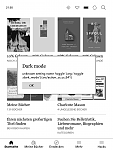
I've tried the following config, but none of the dark-mode scenarios work
Code:
menu_item :browser :Dark mode	:nickel_setting     :toggle :dark_mode
menu_item :reader  :Dark mode	:nickel_setting     :toggle :dark_mode
menu_item :main    :Dark mode	:nickel_setting     :toggle :dark_mode

menu_item :main    :Dark mode1 	:nickel_setting     :enable :dark_mode
menu_item :main    :Dark mode0 	:nickel_setting     :disable :dark_mode

menu_item :main	:Screeshot	:nickel_setting	:toggle	:screenshots