Quote:
Originally Posted by dunhill

Then the installation on the usb that I did with the command does not go and I must try with the calibre script that I have installed locally
|
I did not get a chance to try this until today.
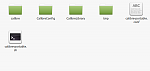
- On a usb stick make a folder named "calibre"*
- On a usb stick make a folder named "CalibreConfig"
- On a usb stick make a folder named "CalibreLibrary"
- On a usb stick make a folder named "tmp"
- Download the tarball version of calibre you want from here
- Extract the tarball to the folder "calibre"
- Copy the calibre-portable.sh file from the usb folder /calibre/resources to the top level of the usb.
- Open a terminal and cd to the usb stick
- enter ./calibre-portable.sh into the terminal press enter
- press enter to start calibre.
Code:
:~$ cd /media/xxxxxxx/gbm
:/media/xxxxxxx/gbm$ ./calibre-portable.sh
Generating default configuration file at /media/xxxxxxx/gbm/calibre-portable.conf
Set any non-default options here.
CONFIG FILES:       /media/xxxxxxx/gbm/CalibreConfig
--------------------------------------------------
LIBRARY FILES:      /media/xxxxxxx/gbm/CalibreLibrary
--------------------------------------------------
SOURCE FILES:       *** Not being Used ***
--------------------------------------------------
PROGRAM FILES:      /media/xxxxxxx/gbm/calibre
--------------------------------------------------
TEMPORARY FILES:    /tmp/CALIBRE_TEMP_fEfBrFz
--------------------------------------------------

Press CTRL-C if you do not want to continue
Press ENTER to continue and start Calibre

Starting up Calibre from portable directory "/media/xxxxxxx/gbm"
Using library at /media/xxxxxxx/gbm/CalibreLibrary
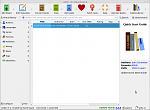
You will now have a portable calibre on a usb stick for linux--I formatted my stick as ext4.
bernie