View Single Post
Old 02-17-2020, 05:31 PM   #24
Tex2002ans
Wizard
Tex2002ans ought to be getting tired of karma fortunes by now.Tex2002ans ought to be getting tired of karma fortunes by now.Tex2002ans ought to be getting tired of karma fortunes by now.Tex2002ans ought to be getting tired of karma fortunes by now.Tex2002ans ought to be getting tired of karma fortunes by now.Tex2002ans ought to be getting tired of karma fortunes by now.Tex2002ans ought to be getting tired of karma fortunes by now.Tex2002ans ought to be getting tired of karma fortunes by now.Tex2002ans ought to be getting tired of karma fortunes by now.Tex2002ans ought to be getting tired of karma fortunes by now.Tex2002ans ought to be getting tired of karma fortunes by now.
 
Posts: 2,306
Karma: 13057279
Join Date: Jul 2012
Device: Kobo Forma, Nook
Quote:
Originally Posted by RbnJrg View Post
Right now Sigil can jump from the name of a style in the Code View to the style definition in the .css stylesheet. [...] In the same way, analogously, would be comfortable for the user to jump from the name of an image in the Code View to its place in the BookBrowser.
I'm scratching my head a teensy bit...

Currently, you can Right-Click the image in Code View > Open Tab for Image:
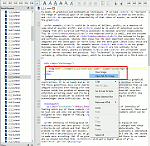
Click image for larger version

Name:	Sigil.Right-Click.Image.Open.Tab.For.Image.png
Views:	416
Size:	40.2 KB
ID:	177221

It zooms in and highlights that image in Book Browser:
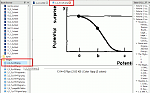
Click image for larger version

Name:	Sigil.Open.Tab.Image.png
Views:	432
Size:	15.5 KB
ID:	177222

(PS. Always keeping the active file highlighted + in the middle of the Book Browser is one of the reasons I prefer Sigil > Calibre. SO much easier than having to scroll through a potentially giant list.)
Tex2002ans is offline   Reply With Quote