View Single Post
Old 09-16-2018, 01:49 PM   #6
gbm
Wizard
gbm ought to be getting tired of karma fortunes by now.gbm ought to be getting tired of karma fortunes by now.gbm ought to be getting tired of karma fortunes by now.gbm ought to be getting tired of karma fortunes by now.gbm ought to be getting tired of karma fortunes by now.gbm ought to be getting tired of karma fortunes by now.gbm ought to be getting tired of karma fortunes by now.gbm ought to be getting tired of karma fortunes by now.gbm ought to be getting tired of karma fortunes by now.gbm ought to be getting tired of karma fortunes by now.gbm ought to be getting tired of karma fortunes by now.
 
Posts: 2,222
Karma: 8888888
Join Date: Jun 2010
Device: Kobo Clara HD,Hisence Sero 7 Pro RIP, Nook STR, jetbook lite
Quote:
Originally Posted by JustinTeim View Post
Thanks, pdurrant; Unless I'm doing something wrong, pasting
sup {
line-height: 1.2em;
}
in Look & Feel / Styling / Extra CSS

does not solve the problem (the superscript is still elevated so that it changes the line spacing).
You will have to use the ebook editor, do not do during conversion.

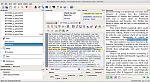
See screenshot I find were a sup or sub is used, get the css property name see the highlighted areas in the File preview and text editor sections.
Click image for larger version

Name:	Screenshot from 2018-09-16 12-26-42.png
Views:	174
Size:	385.8 KB
ID:	166335

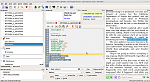
See screenshot two I go to the css file and edit the css property values.

Note these are just the general ones that I use, for some I will add font bold and letter spacing--example a linked footnote.
Click image for larger version

Name:	Screenshot from 2018-09-16 12-27-21.png
Views:	176
Size:	326.6 KB
ID:	166336

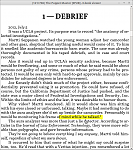
See screenshot three for what is looks like in the calibre ebook viewer.
Click image for larger version

Name:	Screenshot from 2018-09-16 12-28-42.png
Views:	152
Size:	235.8 KB
ID:	166337

bernie
gbm is offline   Reply With Quote