Hello folks,
I know this question has been discussed a few times but none of those answered my questions or discussed the point I am about to make.
The default library structuture of Calibre library is as follows
It's presently
Library Folder ->
Author ->
Title -> individual files inside (formats, cover, metadata)
But I would like to have a folder arranged as
Library Folder ->
Title -> individual files inside (formats, cover, metadata)
Ideally, I don't want Title folder at all but since the metadata file is stored individually, there is no alternative to it.
I found a setting under 'Saving books to the disk' option where I could delete the 'Author Sort' option, so in theory, it should not make that folder.
Calibre default

and I deleted 'Author Sort'
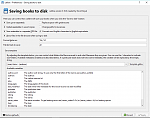
I restarted Calibre after changing the settings.
I imported the files from the previous library and it still makes the folder.
So my questions are -
- Did I misunderstand the use of this option?
- If not, is it making the 'Author Sort' folder because I am using metadata file from the previous library and this information is present in that file?
I can not discard metadata file or make a new one as all my notes about the paper are in that file and there are a couple of thousands of papers in there.
All other threads keep saying that there is no option to change the directory structure and if this is not the thing that can change the structure, I assume, it still can not be changed.
Many thanks for all help.
Edit: On the same note, even if I uncheck boxes for
Save cover separately and
Save metadata in a separate OPF file
I still see these files being created..
What am I missing here?