Quote:
Originally Posted by kovidgoyal

We dont seem to be talking about the same things. The OP, and I, are talking about the remove format button in the Edit Metadata dialog, not the popup of the delete books button.
|
Quote:
Originally Posted by Fussimist
... just finished entering all my ebooks, and after selecting all of them, clicked on Edit Metadata, and clicked Remove Format...
|
When I select
all books and click edit metadata I get this :
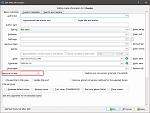
I assumed the OP was seeing similar.
Quote:
Originally Posted by kovidgoyal
And as I said, there is already a confirmation for that, namely the OK button of the edit metadata dialog. I am not going to add another.
And there are two confirmations for drag and drop because one comes from windows, not calibre.
|
I know the second one comes from Windows, that's why I wrote
Quote:
|
I see Windows delves into the file to extract the metadata - that's nice....
|
BTW that message will only pop if you drag the file out of the Recycle Bin folder. You won't see it if drag the file from a regular folder, because a drag into calibre from a regular folder won't remove the file from the regular folder.
If all the books have the same single format, when you click on the Remove Books drop down that format is shown and there's no way to clear it. The only way out is to use Cancel, if you use OK or Apply the delete will proceed.
BR