Quote:
Originally Posted by davidfor

Yes, your use for calibre does make something like this sensible.
Maybe "Custom Identifiers"?
I've never noticed before but there is no column for identifiers. Or, at least I can't see it. That makes and F2 edit hard. But, there is a dialog to edit the identifiers from the metadata editor. There isn't a shortcut to open that directly, but maybe it can be added.
|
I still think Custom Sources is better - but not going to die in a ditch over it. However, I'll say why I prefer it;
- There are 3 database columns with similar names - 'IDs', 'id', and 'uuid' - I often get confused between 'IDs' and 'id'.
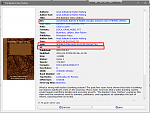
- Amazon is not the identifier, its the source, the ASIN is the Identifier - as in Amazon Standard Identification Number.
If by '
a dialog to edit the identifiers' you mean this :
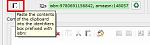
That's for isbn - you'd have to introduce something to select what you call an Identifier and what I call a Source - here's what I have configured
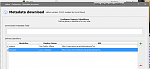
To enter a value I need to remember the identifier, then type it e.g. 'lowypub:', 'ipapub:' etc, and then typically paste in rest of the URL - eg 'islamic-state-propaganda-and-mainstream-media' or '2471/lessons-from-private-cities'
Ideally I would like a list containing "Lowy Institute", "Inst Public Affairs" etc with a column to enter the %s value(s).
In metadata edit I suggest an additional button between the clipboard isbn icon and the text box; similar to the one on Tags that pops the Tag Editor, except it would pop the Custom <whatever> Editor.
Making that editor available with Shift+F2 as chaley did for the Tag Editor wont be 'easy' because there's no Custom <whatever> column. Maybe it could be wrapped in something that could be selected from a toolbar and be assigned a keyboard short cut.
Oh - when customising the Generic Identifiers I was able to Escape out of the dialogue without Saving, even though I added 2 and deleted 1 row. Is an "are you sure" message possible.
BR