View Single Post
Old 01-29-2011, 08:49 PM   #1327
kranu
I <3 my Kindle
kranu can understand the language of future parallel dimensionskranu can understand the language of future parallel dimensionskranu can understand the language of future parallel dimensionskranu can understand the language of future parallel dimensionskranu can understand the language of future parallel dimensionskranu can understand the language of future parallel dimensionskranu can understand the language of future parallel dimensionskranu can understand the language of future parallel dimensionskranu can understand the language of future parallel dimensionskranu can understand the language of future parallel dimensionskranu can understand the language of future parallel dimensions
 
Posts: 528
Karma: 51332
Join Date: Nov 2010
Location: United States
Device: Kindle 3G + WiFi
Quote:
Originally Posted by pietro99 View Post
This is probably staring at me, but how do you create a file called "random" to randomize the screen-savers?

When I right-click I just get options for .txt, .rtf etc.
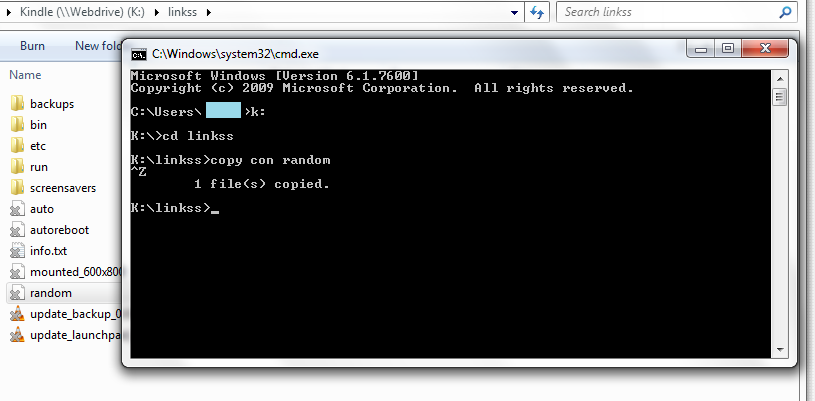
1. Go to Command Prompt (start-> run: cmd)
2. Type in your Kindle Drive Letter (K: or some other letter)
3. Use cd command to go to the linkss folder (cd linkss)
4. Run "copy con random" press enter then Control-Z then enter
5. Verify that it appeared in explorer
Attached Thumbnails
Click image for larger version

Name:	screenshot.png
Views:	1208
Size:	57.2 KB
ID:	65739  

Last edited by kranu; 01-29-2011 at 08:54 PM.
kranu is offline   Reply With Quote